

Setup
Fiserv IPG provides self-service sign-up for a sandbox account. To sign up for an account, visit the Fiserv registration page.Connector configuration
After setting up your Fiserv IPG connector in the dashboard, configure how transactions are routed to it. Choose one of the following options:- Using Flow - Configure Fiserv IPG as the target connector in Flow to automatically route card transactions to this connector
- Using the API - Explicitly set the
payment_service_idparameter to the Fiserv IPG connector ID when creating transactions. This overrides any Flow routing rules.
Credentials
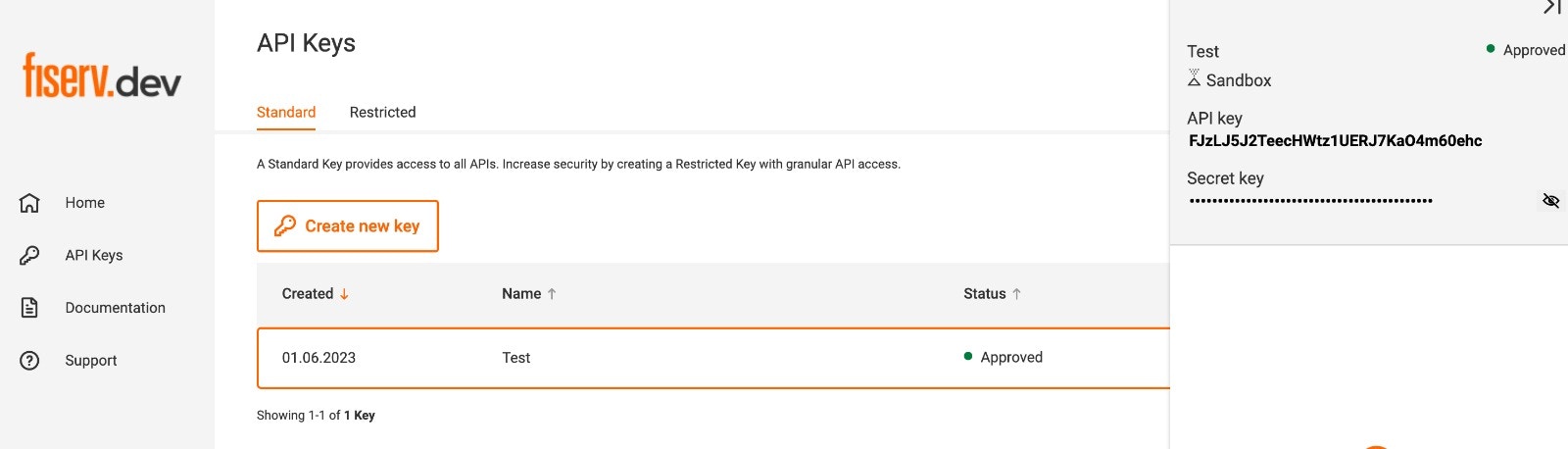
When setting up Fiserv IPG in the dashboard, configure the following credentials from the Fiserv portal.- API key - The API key from the Fiserv dashboard under API Keys.
- Secret key - The secret key found under the API key in the Fiserv dashboard under API Keys.
- Store ID - Your Fiserv store identifier.
- Payment facilitator fields - When operating as a payment facilitator, provide the sub-merchant details described in Payment facilitator (Omnipay).
Payment facilitator (Omnipay)
Payment facilitator support uses Fiserv’s Omnipay platform and is enabled per
connection, by request only. It is not available by default. Contact Gr4vy to
have it configured, and note that your Fiserv account must also be enabled for
payment facilitator (sub-merchant) processing on Fiserv’s side.
- MCC - The merchant category code for the sub-merchant.
- Legal name - The sub-merchant’s registered legal name.
- Email - The sub-merchant’s contact email.
- Merchant ID - The sub-merchant identifier.
- Address - The sub-merchant’s address, including address lines, city, region, postal code, and country.
Zero-dollar authorizations
On the Fiserv connector, zero-dollar (account verification) authorizations use Fiserv’s dedicated card verification API rather than a standard authorization for a zero amount. This is Fiserv’s recommended method for verifying a card without placing a charge, and it applies to all Fiserv card connections, not only payment facilitator connections.Capabilities
This connector supports the Mastercard Transaction Link Identifier (TLID). Gr4vy stores the TLID from the first customer-initiated payment and sends it on later merchant-initiated payments, with nothing to enable.Supported countries
Supported currencies
Limitations
- Google Pay CVV - To accept Google Pay transactions, your Fiserv merchant account or store ID must have the CVV field set as non-mandatory.
- Settlement split - Omnipay’s
settlementSplit(dividing funds across multiple accounts) is not currently supported. Payment facilitator connections receive the full settlement amount.
Integration
To accept card payments with Fiserv, use one of Gr4vy’s client-side integration methods to securely collect card details. Due to PCI compliance requirements, card data should never be sent directly to your servers. You can integrate using:- Embed - A pre-built, customizable payment form that handles the complete payment flow
- Secure Fields - Embed card input fields for building custom payment forms while maintaining PCI compliance
- Mobile SDKs - Embed SDKs for iOS, Android, and React Native
payment_service_id parameter.