

Supported payment methods
Integration shows how the buyer pays:- Direct: you send card or bank account details through Gr4vy, using Embed, Secure Fields, or the API. Gr4vy stores bank accounts. See Bank payments.
- Redirect: the buyer completes the payment on the provider’s page, and the provider keeps their details.
- Redirect or SDK: as redirect, or you can use the provider’s own SDK or components in place of the redirect. See the method’s page.
Setup
Stripe provides a self-service sign-up for a sandbox account. To sign up for an account visit the sign-up page and fill in the details.Credentials
When setting up Stripe in the dashboard, configure the following credentials, which are obtained from Stripe:Secret key
The Stripe Secret key can be found in the Stripe Dashboard under the Developers -> API Keys section.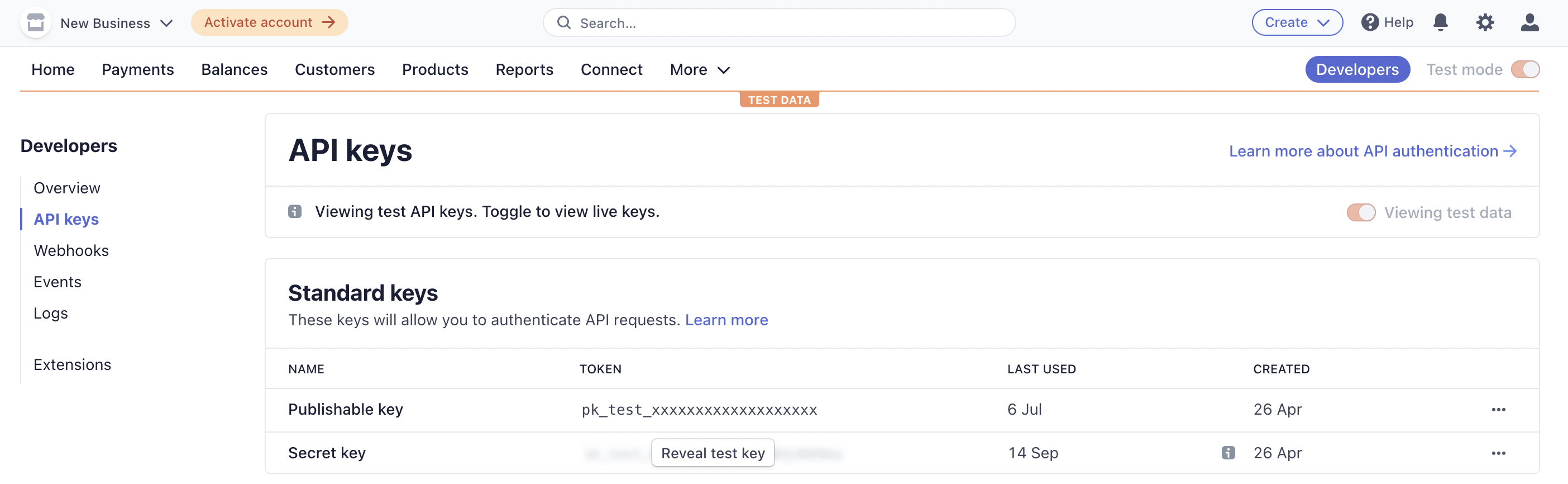
Stripe Secret key
APM credentials
When setting up Stripe APMs in the dashboard, configure the following credentials:- Webhook secret: Find this in the Stripe Dashboard within Developer Settings under Webhooks once webhooks have been configured.
- Stripe connected account: Set this when using Stripe Connect. See Stripe Connect below.
- Publishable key: Used to initialize the Gr4vy hosted web page on a redirect.
Stripe Connect
Stripe Connect lets a platform account make API calls on behalf of a connected merchant account. This configuration is optional. Leave it empty for standard (non-Connect) integrations where all transactions run directly on the platform account.Credential field
Most Stripe connectors expose a Stripe connected account field in the connection settings. Setting it applies the connected account to every operation on that connection.Per-transaction override
To route individual transactions to different connected accounts, pass the connected account as a connection option when creating a transaction.Webhooks with Stripe Connect
When a connected account is configured, incoming webhooks are matched against the configured Stripe account. Events that belong to a different account are rejected. If you process payments across multiple connected accounts, configure a separate Stripe connection for each account with the matching connected account ID.APM payment IDs
When creating the transaction, thepayment_service_transaction_id is the client secret, and in the extra_xids field you can find the payment intent ID as payment_id.
After the transaction is approved by the user, the payment_service_transaction_id is updated to the payment intent ID.
Webhooks
Webhooks are useful as they allow receiving updates about transactions processed. This can be configured in the Stripe dashboard by creating an event destination. Each Gr4vy Stripe connection, such as card, Affirm, or Klarna, has its own webhook URL. Create a separate event destination for each connection:- In the Gr4vy dashboard, go to Connections -> Configured connections, select the Stripe connection, then scroll to the Synchronization section and copy the webhook URL.
- In the Stripe dashboard, create an event destination with that URL and the events listed on the connection’s page.
- If you set a Webhook secret on the connection, use the signing secret of this event destination. Gr4vy ignores events whose signature doesn’t match.
payment_intent.canceledcharge.expiredcharge.refund.updatedcharge.refundedpayment_intent.succeededpayment_intent.amount_capturable_updatedpayment_intent.payment_failed
Recurring payments
The Stripe connector can operate as either an open or a closed-loop connector. In a closed-loop configuration a Stripe token is used for every transaction, which means you can not process a subsequent payment with another provider. In an open-loop situation card data from the vault is used for every transaction, allowing processing transactions in a recurring payments with a different payment service for every transaction. By default, your Stripe connector works in a closed-loop configuration, as Stripe requires open-loop to be enabled for your account before transactions can be processed that way. Open-loop can be enabled in the connection settings through the dashboard. After enabling open-loop and saving the changes, a new check-box appears to enable network tokens. Please contact the support team for additional guidance.Digital wallets
Recurring Apple Pay and Google Pay are supported through Stripe in a close-loop configuration. For this to work you need to contact Stripe to get decoded Apple and Google Pay token pass-through enabled on their/v1/tokens API. Recurring digital wallet payments on
Stripe in an open-loop configuration are currently not supported as this requires a different Stripe API. Support for this is planned for the near future.
Gated features
Stripe gates certain features on the platform and enables each one on your account on request. Contact your Stripe account manager to enable them. Stripe enables these features per Stripe account, so every Stripe account you connect to Gr4vy needs them. If your sub-merchants connect their own Stripe accounts, each of those accounts needs the features as well. Check with Stripe whether your platform setup can extend them to connected accounts, or whether each account needs its own request. Some features require Gr4vy’s PCI DSS Attestation of Compliance (AoC). Please contact the Gr4vy support team to obtain a copy.Raw PAN processing
The integration relies on the ability to pass Stripe the full card number (PAN). Until Stripe enables raw PAN processing on your account, transactions fail with the following error.Sending credit card numbers directly to the Stripe API is generally unsafe. We suggest you use test tokens that map to the test card you are using, see https://stripe.com/docs/testing. To enable testing raw card data APIs, see https://support.stripe.com/questions/enabling-access-to-raw-card-data-apis.
Third-party network tokens
Stripe refers to third-party network tokens as Bring Your Own Token (BYOT). Once BYOT is enabled, your Stripe account accepts network tokens provisioned under your token requestor ID (TRID).Decrypted wallet tokens
Gr4vy decrypts Apple Pay and Google Pay payloads and sends the decrypted wallet payload to Stripe, rather than the encrypted wallet payload. This feature needs to be enabled before Apple Pay and Google Pay processing can be initiated.Stored credential transaction type
This feature lets Gr4vy submit MITs that reference network transaction IDs to Stripe, which is the established pattern for processing subsequent payments across multiple processors.Merchant-initiated payments without a network transaction ID
When Gr4vy sends Stripe a merchant-initiated payment with card details or a network token from the Gr4vy vault (open loop), it includes the network transaction ID of an earlier payment. If Gr4vy holds no network transaction ID for the card, it asks Stripe to process the payment without one by sendingpayment_method_options[card][mit_exemption][claim_without_transaction_id].
Stripe must enable this parameter on your account. Until it does, Stripe rejects these payments as using an unknown parameter, and the transaction fails with the error code invalid_service_request.
3DS Import
When Gr4vy runs 3-D Secure, or you pass your own external 3-D Secure data, Gr4vy sends the authentication result to Stripe with Stripe’s 3DS Import. Stripe must enable 3DS Import on your account. Until it does, Stripe rejects the 3-D Secure data, and the transaction fails with the error codeinvalid_service_configuration.
When Gr4vy sends 3-D Secure data this way, it also sets Stripe’s error_on_requires_action, so Stripe doesn’t start its own authentication for that payment.
3-D Secure handled by Stripe
If Gr4vy doesn’t run 3-D Secure and you don’t pass external 3-D Secure data, Stripe decides whether to authenticate the buyer. When Stripe asks for authentication, the transaction is pending with anapproval_url. Send the buyer to this URL to complete the challenge, as described in hosted 3-D Secure.
To fail these payments instead of sending the buyer to Stripe, set the error_on_requires_action connection option to true.