> ## Documentation Index
> Fetch the complete documentation index at: https://docs.gr4vy.com/llms.txt
> Use this file to discover all available pages before exploring further.
# PayPal via the API
To handle PayPal via the API directly, follow the [quick start guide](/guides/payments/direct-api/quick-start) on
direct API integrations, or use the steps below.
## Create a transactions
To create a PayPal transaction, set the `method` to `paypal` and the `redirect_url` to the endpoint of the app that can handle the customer returning once they've completed approving the transaction on `paypal.com`.
See the [`POST /transactions`](/reference/transactions/new-transaction) API endpoint for more details.
```csharp C# theme={"system"}
var transaction = await client.Transactions.CreateAsync(
transactionCreate: new TransactionCreate()
{
Amount = 1299,
Currency = "USD",
Country = "US",
PaymentMethod =
TransactionCreatePaymentMethod.CreateCheckoutSessionWithUrlPaymentMethodCreate(
new RedirectPaymentMethodCreate()
{
Method = "paypal",
RedirectUrl = "https://example.com/callback",
}
),
}
);
```
```go Go theme={"system"}
amount := int64(1299)
currency := "USD"
method := "paypal"
redirectUrl: "https://example.com/callback"
redirectPaymentMethodCreate := components.RedirectPaymentMethodCreate{
Method: method,
RedirectUrl: redirectUrl
}
paymentMethod := components.CreateTransactionCreatePaymentMethodRedirectPaymentMethodCreate(redirectPaymentMethodCreate)
transactionCreate := components.TransactionCreate{
Amount: amount,
Currency: currency,
PaymentMethod: &paymentMethod,
}
transaction, err := client.Transactions.Create(ctx, transactionCreate, nil, nil)
// handle response
```
```java Java theme={"system"}
CreateTransactionResponse transactionResponse = gr4vyClient.transactions().create()
.transactionCreate(TransactionCreate.builder()
.amount(1299L)
.currency("USD")
.paymentMethod(TransactionCreatePaymentMethod.of(RedirectPaymentMethodCreate.builder()
.method("paypal")
.redirectUrl("https://example.com/callback")
.build()))
.build())
.call();
Transaction transaction = transactionResponse.transaction().orElse(null);
// handle response
```
```php PHP theme={"system"}
$transactionCreate = new TransactionCreate(amount: 1299, currency: 'USD', paymentMethod: new RedirectPaymentMethodCreate(method: 'paypal', redirectUrl: 'https://example.com/callback'));
$response = self::$sdk->transactions->create($transactionCreate);
$transaction = $response->transaction;
```
```python Python theme={"system"}
transaction: models.Transaction = client.transactions.create(
amount=1299,
currency="USD",
payment_method={
"method": "paypal",
"redirect_url": "https://example.com/callback",
}
)
```
```ts TypeScript theme={"system"}
const transaction = await gr4vy.transactions.create({
amount: 1299,
currency: "USD",
paymentMethod: {
method: "paypal",
redirectUrl: "https://example.com/callback"
}
})
```
If successful, the response of this transaction includes a `status` set to `buyer_approval_pending` as well as a `payment_method.approval_url`.
```json Response theme={"system"}
{
"type": "transaction",
"id": "0c41c8df-27f4-480e-97f0-9401558ae25e",
"status": "buyer_approval_pending",
"intent": "authorize",
"payment_method": {
"type": "payment-method",
"method": "paypal",
"mode": "redirect",
"approval_url": "https://www.sandbox.paypal.com/checkoutnow?token=7NP38594266148058",
...
},
"method": "paypal",
...
}
```
## About tokenization
If the PayPal account supports **Reference Transactions**, then pass the `store=true` parameter to each request to vault a buyer's PayPal account for future use.
This does require ticking the **Payment tokenization** toggle for the PayPal connection in the dashboard.
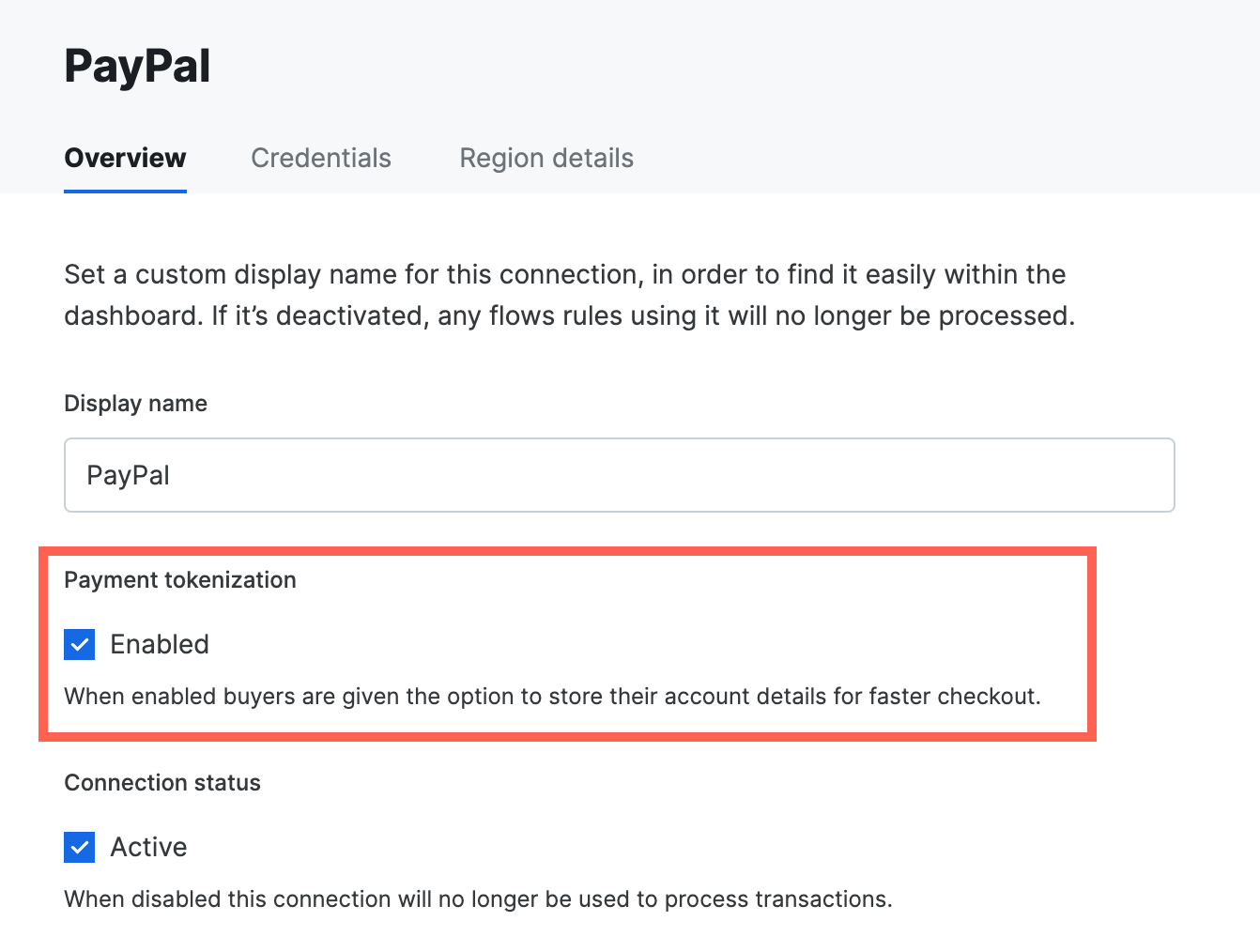 Once stored, use the stored PayPal account for future transactions without redirecting the buyer to PayPal.
## Handle redirect to PayPal
The app needs to redirect the customer to PayPal where they are required to authenticate the payment. To do so, redirect the customer to the `payment_method.approval_url`. After they've authenticated themselves, the customer is redirected back to the `redirect_url` that was set when creating the transaction.
If the customer abandons the checkout or somehow experiences network
connection issues, the transaction state can get out of sync between the
app and the system. [The following best
practices](/guides/best-practices/overview) are recommended in handling these situations.
## Handle the return to the app
When the customer is redirected back to the app, the transaction status is not known. The app therefore needs to call the API to get the latest transaction status. To do this, the `redirect_url` is appended with the `transaction_id`.
```
[redirect_url]?transaction_id=2f37e0d0-5549-42c4-9c5c-e03d5fa97148&transaction_status=capture_succeeded
```
Although we also provide the `transaction_status` in this callback, it's
recommended to also fetch the latest status via the API, as the status may
have changed since.
After handling the redirect, display a message to the customer letting them know the result of the transaction.
## Fetch the latest status
Finally, after the transaction has been created your application can get the
latest details and status \[using the transaction ID]\(/reference/transactions/get-transaction received via the callback to
the redirect URL, or on direct callback from the API. The transaction includes details about the payment method used and the status
of the transaction.
```json theme={"system"}
{
"type": "transaction",
"id": "fe26475d-ec3e-4884-9553-f7356683f7f9",
"status": "authorized",
"amount": 1299,
"currency": "AUD",
"payment_method": {
"type": "payment-method",
"id": "77a76f7e-d2de-4bbc-ada9-d6a0015e6bd5",
"method": "card",
...
},
...
}
```
The transaction includes details about the payment method used and the status
of the transaction.
```json theme={"system"}
{
"type": "transaction",
"id": "fe26475d-ec3e-4884-9553-f7356683f7f9",
"status": "authorized",
"amount": 1299,
"currency": "AUD",
"payment_method": {
"type": "payment-method",
"id": "77a76f7e-d2de-4bbc-ada9-d6a0015e6bd5",
"method": "paypal",
...
},
...
}
```
Visit the [API reference documentation](/reference) for full details about the
transaction resource, and any other API.
## Webhooks
In order to receive timely updates regarding the status of PayPal transactions please set up a PayPal webhook URL. In
the [PayPal Merchant Dashboard](https://www.paypal.com/signin) create a webhook with that URL. Once set up, a
webhook ID is provided by PayPal, provide this back to the team.
## FraudNet
FraudNet is a PayPal-developed, JavaScript library that collects browser-based data to help reduce fraud. Upon checkout, the FraudNet library sends data elements to PayPal Risk Services for fraud and risk assessment.
When creating transactions using PayPal Billing Agreements, the PayPal FraudNet library must be included on the checkout page for all transactions. When using Embed, the PayPal FraudNet library is included automatically. If using Direct API directly, use the [device fingerprinting library](/guides/features/anti-fraud/fingerprint) which includes the PayPal FraudNet library.
## Set transaction context values (STC)
Set transaction context values (STC) are used to provide additional information to support PayPal's advanced risk analysis. Below is an outline of the values required. These values should be included in the connection options for PayPal (`connection_options[paypal-paypal]`). Below are examples for a retail or a marketplace transaction where retail transactions are those sold directly by the merchant on record, while a marketplace transaction is sold by a third party on the merchant's website.
PayPal uses `sender` and `receiver` to refer to the transfer of funds where the `sender` is the buyer who is transmitting funds to the `reciever` or merchant.
| Data Field Name | Description | Use case | Sample values |
| :------------------------------ | :------------------------------------------------------------------------------------------------------------------------------------------------------------------------------------------- | :---------- | :------------------------------------------------------ |
| `sender_account_id` | Unique buyer ID | Both | `buyer_id` or buyer's `external_identifier` |
| `sender_first_name` | Buyer's first name | Both | `first_name` |
| `sender_last_name` | Buyer's last name | Both | `last_name` |
| `sender_email` | Buyer's email address | Both | `email_address` |
| `sender_phone` | Buyer's phone number | Both | `phone_number` |
| `sender_country_code` | Buyer's country code in ISO Alpha-2 Country code | Both | `AU` or `NZ` |
| `sender_create_date` | Creation date of the buyer's account in ISO 8601 date format | Both | `created_at` |
| `sender_signup_ip` | IP address that the buyer used to sign up to the platform | Marketplace | `10.220.90.20 ` |
| `sender_popularity_score` | Risk-based scoring on the buyer, best efforts assessment by the marketplace | Marketplace | high, medium or low |
| `receiver_account_id` | Unique seller ID | Marketplace | `A12345N343` |
| `receiver_create_date` | Date of seller creation on marketplace platform in ISO 8601 date format | Marketplace | `2024-06-09T 19:14:55.277-0:00` |
| `receiver_email` | Seller's registered email on the marketplace platform | Marketplace | [seller@marketplace.com](mailto:seller@marketplace.com) |
| `receiver_address_country_code` | Sellers's country code in ISO Alpha-2 Country code | Marketplace | `US` |
| `business_name` | Seller's business name on the marketplace | Marketplace | `Seller Pty Ltd` |
| `recipient_popularity_score` | Risk-based scoring on the seller, best efforts assessment by the marketplace | Marketplace | high, medium or low |
| `first_interaction_date` | Date of the first integration between the buyer and seller on the marketplace | Marketplace | `2024-06-09T 19:14:55.277-0:00` |
| `txn_count_total` | Total number of transactions between the buyer and seller to date, across all methods | Marketplace | 3 |
| `delivery_information` | Delivery method for an intangible item if there is an associated email/phone. It acts as the shipping address for an intangible, only required for intangible goods (for example gift cards) | Retail | `phone_number` or `email_address` |
| `highrisk_txn_flag` | Flag for high-risk items such as gift cards where (1) is high risk and (0) is non high risk | Retail | Boolean value (0 or 1) |
| `transaction_is_tangible` | The item being solid is tangible (1) or intangible (0) | Marketplace | Boolean value (0 or 1) |
| `vertical` | Vertical flag for the seller transactions that are in several verticals | Both | Retail, Household goods, clothing, tickets |
Once stored, use the stored PayPal account for future transactions without redirecting the buyer to PayPal.
## Handle redirect to PayPal
The app needs to redirect the customer to PayPal where they are required to authenticate the payment. To do so, redirect the customer to the `payment_method.approval_url`. After they've authenticated themselves, the customer is redirected back to the `redirect_url` that was set when creating the transaction.
If the customer abandons the checkout or somehow experiences network
connection issues, the transaction state can get out of sync between the
app and the system. [The following best
practices](/guides/best-practices/overview) are recommended in handling these situations.
## Handle the return to the app
When the customer is redirected back to the app, the transaction status is not known. The app therefore needs to call the API to get the latest transaction status. To do this, the `redirect_url` is appended with the `transaction_id`.
```
[redirect_url]?transaction_id=2f37e0d0-5549-42c4-9c5c-e03d5fa97148&transaction_status=capture_succeeded
```
Although we also provide the `transaction_status` in this callback, it's
recommended to also fetch the latest status via the API, as the status may
have changed since.
After handling the redirect, display a message to the customer letting them know the result of the transaction.
## Fetch the latest status
Finally, after the transaction has been created your application can get the
latest details and status \[using the transaction ID]\(/reference/transactions/get-transaction received via the callback to
the redirect URL, or on direct callback from the API. The transaction includes details about the payment method used and the status
of the transaction.
```json theme={"system"}
{
"type": "transaction",
"id": "fe26475d-ec3e-4884-9553-f7356683f7f9",
"status": "authorized",
"amount": 1299,
"currency": "AUD",
"payment_method": {
"type": "payment-method",
"id": "77a76f7e-d2de-4bbc-ada9-d6a0015e6bd5",
"method": "card",
...
},
...
}
```
The transaction includes details about the payment method used and the status
of the transaction.
```json theme={"system"}
{
"type": "transaction",
"id": "fe26475d-ec3e-4884-9553-f7356683f7f9",
"status": "authorized",
"amount": 1299,
"currency": "AUD",
"payment_method": {
"type": "payment-method",
"id": "77a76f7e-d2de-4bbc-ada9-d6a0015e6bd5",
"method": "paypal",
...
},
...
}
```
Visit the [API reference documentation](/reference) for full details about the
transaction resource, and any other API.
## Webhooks
In order to receive timely updates regarding the status of PayPal transactions please set up a PayPal webhook URL. In
the [PayPal Merchant Dashboard](https://www.paypal.com/signin) create a webhook with that URL. Once set up, a
webhook ID is provided by PayPal, provide this back to the team.
## FraudNet
FraudNet is a PayPal-developed, JavaScript library that collects browser-based data to help reduce fraud. Upon checkout, the FraudNet library sends data elements to PayPal Risk Services for fraud and risk assessment.
When creating transactions using PayPal Billing Agreements, the PayPal FraudNet library must be included on the checkout page for all transactions. When using Embed, the PayPal FraudNet library is included automatically. If using Direct API directly, use the [device fingerprinting library](/guides/features/anti-fraud/fingerprint) which includes the PayPal FraudNet library.
## Set transaction context values (STC)
Set transaction context values (STC) are used to provide additional information to support PayPal's advanced risk analysis. Below is an outline of the values required. These values should be included in the connection options for PayPal (`connection_options[paypal-paypal]`). Below are examples for a retail or a marketplace transaction where retail transactions are those sold directly by the merchant on record, while a marketplace transaction is sold by a third party on the merchant's website.
PayPal uses `sender` and `receiver` to refer to the transfer of funds where the `sender` is the buyer who is transmitting funds to the `reciever` or merchant.
| Data Field Name | Description | Use case | Sample values |
| :------------------------------ | :------------------------------------------------------------------------------------------------------------------------------------------------------------------------------------------- | :---------- | :------------------------------------------------------ |
| `sender_account_id` | Unique buyer ID | Both | `buyer_id` or buyer's `external_identifier` |
| `sender_first_name` | Buyer's first name | Both | `first_name` |
| `sender_last_name` | Buyer's last name | Both | `last_name` |
| `sender_email` | Buyer's email address | Both | `email_address` |
| `sender_phone` | Buyer's phone number | Both | `phone_number` |
| `sender_country_code` | Buyer's country code in ISO Alpha-2 Country code | Both | `AU` or `NZ` |
| `sender_create_date` | Creation date of the buyer's account in ISO 8601 date format | Both | `created_at` |
| `sender_signup_ip` | IP address that the buyer used to sign up to the platform | Marketplace | `10.220.90.20 ` |
| `sender_popularity_score` | Risk-based scoring on the buyer, best efforts assessment by the marketplace | Marketplace | high, medium or low |
| `receiver_account_id` | Unique seller ID | Marketplace | `A12345N343` |
| `receiver_create_date` | Date of seller creation on marketplace platform in ISO 8601 date format | Marketplace | `2024-06-09T 19:14:55.277-0:00` |
| `receiver_email` | Seller's registered email on the marketplace platform | Marketplace | [seller@marketplace.com](mailto:seller@marketplace.com) |
| `receiver_address_country_code` | Sellers's country code in ISO Alpha-2 Country code | Marketplace | `US` |
| `business_name` | Seller's business name on the marketplace | Marketplace | `Seller Pty Ltd` |
| `recipient_popularity_score` | Risk-based scoring on the seller, best efforts assessment by the marketplace | Marketplace | high, medium or low |
| `first_interaction_date` | Date of the first integration between the buyer and seller on the marketplace | Marketplace | `2024-06-09T 19:14:55.277-0:00` |
| `txn_count_total` | Total number of transactions between the buyer and seller to date, across all methods | Marketplace | 3 |
| `delivery_information` | Delivery method for an intangible item if there is an associated email/phone. It acts as the shipping address for an intangible, only required for intangible goods (for example gift cards) | Retail | `phone_number` or `email_address` |
| `highrisk_txn_flag` | Flag for high-risk items such as gift cards where (1) is high risk and (0) is non high risk | Retail | Boolean value (0 or 1) |
| `transaction_is_tangible` | The item being solid is tangible (1) or intangible (0) | Marketplace | Boolean value (0 or 1) |
| `vertical` | Vertical flag for the seller transactions that are in several verticals | Both | Retail, Household goods, clothing, tickets |