> ## Documentation Index
> Fetch the complete documentation index at: https://docs.gr4vy.com/llms.txt
> Use this file to discover all available pages before exploring further.
# Payment links
> Set up payment links to accept payments from your customers.
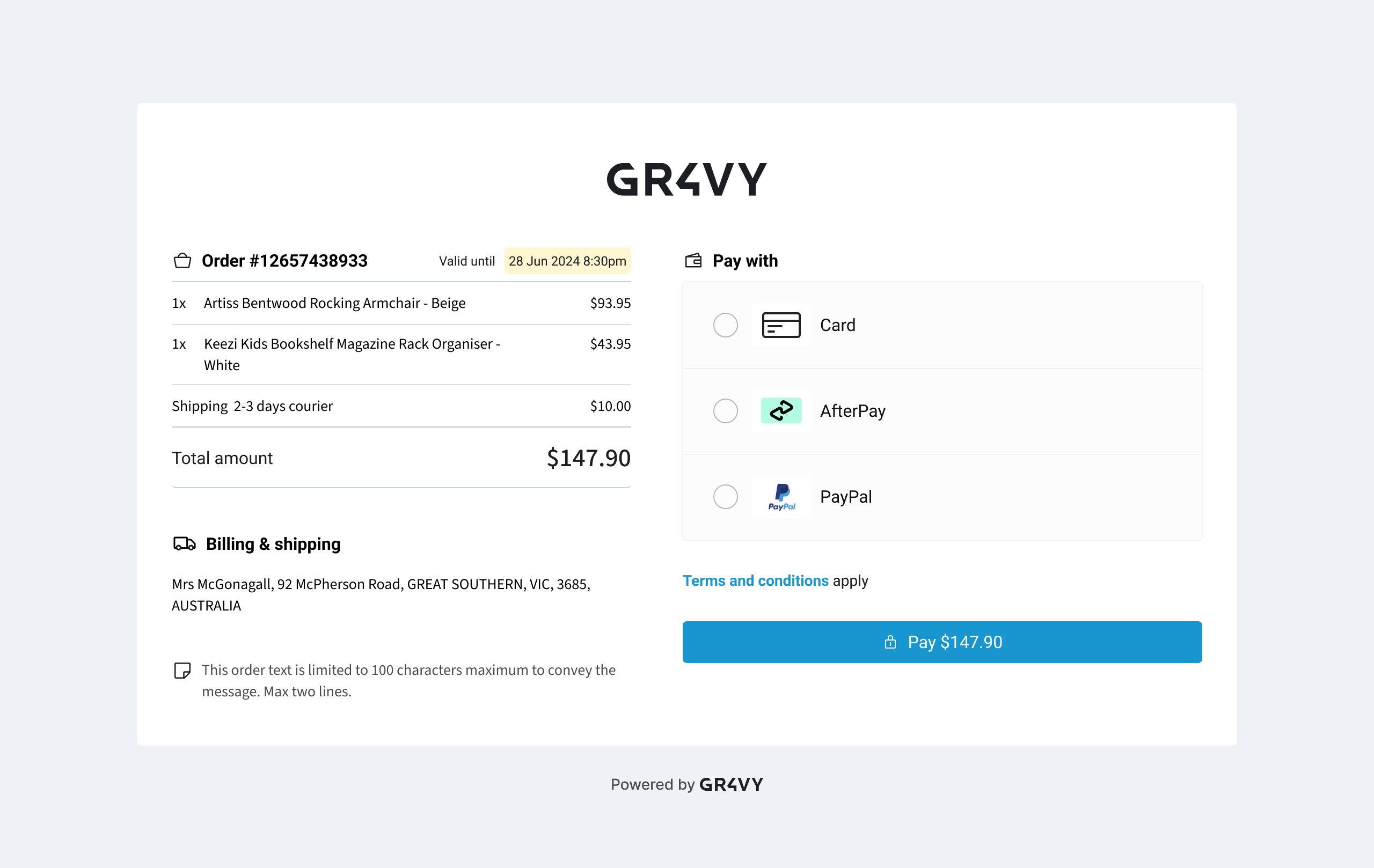 Payment links allows generation of a link, to send to a customer via email/sms/etc,
and then have the customer pay without the need to host a custom checkout.
## Creating a payment link
Use the payment links endpoint to create a payment link with the data displayed on the hosted page. The [payment links API endpoint](/reference/payment-links/new-payment-link) makes it
easy to get create a new payment link.
```json Request theme={"system"}
{
"currency":"AUD",
"country":"AU",
"amount":1000,
"metadata":{
"TypeOfPayment":"purchase",
"Carbon_FootPrint":"10"
},
"cart_items":[
{
"name":"Aloe",
"unit_amount":1000,
"quantity":1,
"sku":"aloe"
}
],
"merchant_banner_url":"https://susies.store/logo.svg",
"merchant_color":"#cf6b6b",
"merchant_name":"Susie's Store",
"merchant_message":"Thanks for your purchase at Susie's Store!",
"merchant_terms_and_conditions_url":"https://susies.store/terms-and-conditions",
"return_url":"https://susies.store/success"
}
```
The payment link includes the `expires_at`, `status`, and other useful information
used by the hosted page. Make note of the returned `id` as it is used in the next step.
```json Response theme={"system"}
{
"id": "09e90ace-a746-41f5-88d2-8b16335ded97",
"type": "payment-link",
"expires_at": "2025-01-28T14:45:45.929102+00:00",
"amount": 1000,
"currency": "AUD",
"country": "AU",
"status": "active",
...
}
```
On top of the `merchant_*` specific values, this API supports values that are displayed by the hosted page
and also passed to [Embed](/guides/payments/embed/options#options) to process the transaction.
* `amount`
* `currency`
* `country`
* `metadata`
* `cart_items`
* `buyer`
* `externalIdentifier`
* `intent`
* `paymentSource`
* `statementDescriptor`
* `buyer_id`
* `store`
By creating a payment link, send it to the customer to complete the payment.
## Storing a payment method
A payment link can be used to securely store a payment method against a buyer's
profile. To do this, you need to pass both the `buyer_id` and `store`
parameters.
When `store` is set to `true`, the `buyer_id` of an existing buyer must also be
provided. After the payment is completed, the payment method used is
stored and associated with that buyer.
Currently, it is not possible to use a buyer's existing stored payment methods
to complete a payment link.
When `buyer_id` is provided, the URL of the payment link should be treated as a secret as
it allows anyone the ability to manage payment methods for the associated buyer.
Payment links allows generation of a link, to send to a customer via email/sms/etc,
and then have the customer pay without the need to host a custom checkout.
## Creating a payment link
Use the payment links endpoint to create a payment link with the data displayed on the hosted page. The [payment links API endpoint](/reference/payment-links/new-payment-link) makes it
easy to get create a new payment link.
```json Request theme={"system"}
{
"currency":"AUD",
"country":"AU",
"amount":1000,
"metadata":{
"TypeOfPayment":"purchase",
"Carbon_FootPrint":"10"
},
"cart_items":[
{
"name":"Aloe",
"unit_amount":1000,
"quantity":1,
"sku":"aloe"
}
],
"merchant_banner_url":"https://susies.store/logo.svg",
"merchant_color":"#cf6b6b",
"merchant_name":"Susie's Store",
"merchant_message":"Thanks for your purchase at Susie's Store!",
"merchant_terms_and_conditions_url":"https://susies.store/terms-and-conditions",
"return_url":"https://susies.store/success"
}
```
The payment link includes the `expires_at`, `status`, and other useful information
used by the hosted page. Make note of the returned `id` as it is used in the next step.
```json Response theme={"system"}
{
"id": "09e90ace-a746-41f5-88d2-8b16335ded97",
"type": "payment-link",
"expires_at": "2025-01-28T14:45:45.929102+00:00",
"amount": 1000,
"currency": "AUD",
"country": "AU",
"status": "active",
...
}
```
On top of the `merchant_*` specific values, this API supports values that are displayed by the hosted page
and also passed to [Embed](/guides/payments/embed/options#options) to process the transaction.
* `amount`
* `currency`
* `country`
* `metadata`
* `cart_items`
* `buyer`
* `externalIdentifier`
* `intent`
* `paymentSource`
* `statementDescriptor`
* `buyer_id`
* `store`
By creating a payment link, send it to the customer to complete the payment.
## Storing a payment method
A payment link can be used to securely store a payment method against a buyer's
profile. To do this, you need to pass both the `buyer_id` and `store`
parameters.
When `store` is set to `true`, the `buyer_id` of an existing buyer must also be
provided. After the payment is completed, the payment method used is
stored and associated with that buyer.
Currently, it is not possible to use a buyer's existing stored payment methods
to complete a payment link.
When `buyer_id` is provided, the URL of the payment link should be treated as a secret as
it allows anyone the ability to manage payment methods for the associated buyer.