> ## Documentation Index
> Fetch the complete documentation index at: https://docs.gr4vy.com/llms.txt
> Use this file to discover all available pages before exploring further.
# Apple Pay on web without Embed
It is possible to use Apple Pay on the web without the SDK. To learn how to integrate
Apple Pay, following Apple's [documentation][documentation] is recommended.
The steps below highlight the basics and focus on the interaction with the API.
A full [code sample is available](https://github.com/gr4vy/sample-standalone-apple-pay) that shows this integration in action.
## About this integration
Similar to the standard Embed integration, there is minimal configuration to get set up to
process Apple Pay on the web. There is no need to sign up for an Apple Developer account
with this integration.
* Upload the **Domain Association File** to your website.
* Enable Apple Pay in your merchant dashboard.
Additionally, you then need to implement the following.
* Load the Apple Pay JS SDK.
* Render an Apple Pay button.
* Handle the click of the button.
* Verify the Apple Pay session.
* Catch the Apple Pay token and pass it to the API for processing.
## Enable Apple Pay
To enable Apple Pay, head over to your dashboard and then go to
**Connections** -> **Catalog** -> **Apple Pay**.
Next, complete, and submit the form to create a new Apple Pay service.
### Registering a domain
To process Apple Pay via the web, register all the domains where the buyer can
checkout. In order to do this, navigate to the Apple Pay service via the dashboard, **Connections** -> **Apple Pay** -> **Domains** -> **Add domain name**.
**Domain Association File**
Before submitting a domain name, please download the Domain Association File from
the dashboard and upload it to every domain you wish to support.
The file needs to be added to every domain in a predefined location.
```
https://{domain}/.well-known/apple-developer-merchantid-domain-association
```
This file is checked by Apple in the production environment
to verify that permission has been granted to perform
Apple Pay transactions on your dashboard.
## Integrate Apple Pay
### Load the Apple Pay JS SDK
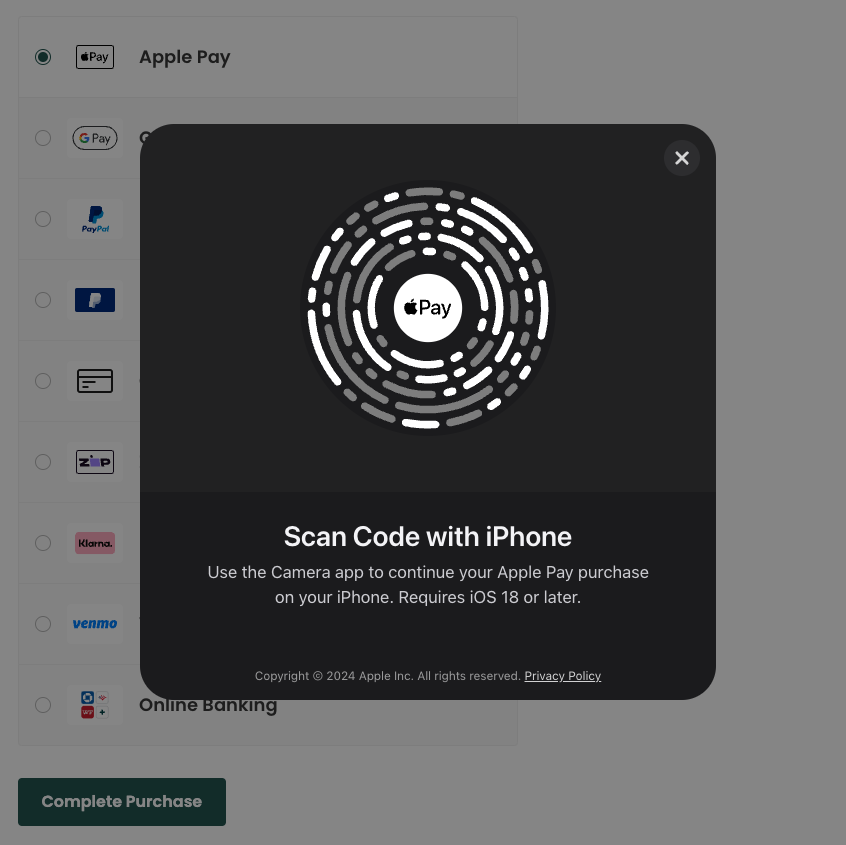
Since iOS 18, users can shop with Apple Pay on devices other than Macs and non-Safari browsers. On submit, a popup displays asking users to scan a code with their iOS 18+ device and complete the payment there.
To enable Apple Pay in browsers besides Safari, load the Apple Pay JS SDK into the app. It is safe to load this same library in Safari as well.
```html theme={"system"}
```
#### Content Security Policy
Make sure to allow the Apple Pay JS SDK domain in your CSP if you're using one; otherwise, the script does not load and the Apple Pay option does not show in third-party browsers.
```
default-src 'self' applepay.cdn-apple.com ...; script-src 'self' applepay.cdn-apple.com ...
```
Please see the [Pay with Apple Pay in third-party browsers documentation](https://support.apple.com/en-jo/guide/safari/ibrw9b779bd3/mac) for more information.
### Render an Apple Pay button
An Apple Pay button can be displayed and customized [with Apple specific CSS](https://developer.apple.com/documentation/apple_pay_on_the_web/displaying_apple_pay_buttons_using_css).
```html theme={"system"}
```
### Handle button click
When a button is clicked, start an [Apple Pay Session](https://developer.apple.com/documentation/apple_pay_on_the_web/apple_pay_js_api/creating_an_apple_pay_session).
```js theme={"system"}
const onClick = async () => {
const session = new ApplePaySession(3, {
countryCode: 'AU',
currencyCode: 'AUD',
merchantCapabilities: ["supports3DS"],
supportedNetworks: ["visa", "masterCard", "amex", "discover"],
total: {
label: "Demo (Card is not charged)",
type: "final",
amount: '12.99',
},
});
...
session.begin();
};
```
### Verify session
Next, this is the bit that's specific to the API. Make an API call to the Apple Pay session endpoint to verify the Apple Pay session for
your domain. This checks if accepting Apple Pay on your domain is allowed.
For this to work it's important to [register the domain](/guides/features/apple-pay/web#enabling-apple-pay)
your domain for use with Apple Pay in the dashboard.
```js theme={"system"}
...
session.onvalidatemerchant = async (event) => {
const response = await fetch(`http://api.sandbox.example.gr4vy.app/digital-wallets/apple/session`, {
method: "POST",
headers: {
"Authorization": `bearer [JWT]`,
"Content-Type": "application/json",
},
body: JSON.stringify({
validation_url: event.validationURL,
domain_name: document.location.hostname,
}),
});
const merchantSession = await response.json();
session.completeMerchantValidation(merchantSession);
};
session.begin();
```
When using a real card in a sandbox environment, the validation URL is rejected by the
[`POST /digital-wallets/apple/session`](/reference/digital-wallets/get-apple-pay-session) endpoint. Please only use test cards in the sandbox environment.
### Create a transaction
Finally, once the Apple Pay transaction has been authorized by Apple, create a transaction with the API.
This API call could be made in your frontend code, or the token could be sent to your backend for processing.
```js theme={"system"}
session.onpaymentauthorized = (event) => {
await fetch(`http://api.sandbox.example.gr4vy.app/transactions`, {
method: "POST",
headers: {
"Authorization": `bearer [JWT]`,
"Content-Type": "application/json",
},
body: JSON.stringify({
amount: 1299,
currency: "AUD",
country: "AU",
payment_method: {
method: "applepay",
token: event.payment.token,
},
}),
});
session.completePayment({
status: ApplePaySession.STATUS_SUCCESS,
});
};
session.begin();
```
## Common issues
There could be many reasons why this doesn't show.
* Make sure you are using an [Apple Pay compatible browser and device](https://support.apple.com/en-gb/102896)
* Make sure an Apple account is set up on the device and cards are added to it
* Make sure the system is set up to handle Apple Pay
* Check the Apple Pay connection is enabled
* Check the Apple Pay connection is set up to handle transactions on the domain you're testing on
* Check a card connector is enabled for the selected country/currency
* Check that a Flow rule doesn't hide Apple Pay
There could be a few reasons why this doesn't show but most likely
this means the card was sent to a connector that either doesn't understand
Apple Pay cards, or did not recognize the test card.
This seems to happen at times with the test cards provided by Apple. Try a
different card, or try again later.
When using a real card in a sandbox environment, Apple Pay fails to initialize. This results
in the Apple Pay UI quickly appearing and then disappearing.
The reason for this happening is that the validation URL generated by Apple Pay is rejected by
the [`POST /digital-wallets/apple/session`](/reference/digital-wallets/get-apple-pay-session) endpoint. Please only use [test cards](./testing) in the sandbox
environment.
[documentation]: https://developer.apple.com/documentation/apple_pay_on_the_web/
 To enable Apple Pay in browsers besides Safari, load the Apple Pay JS SDK into the app. It is safe to load this same library in Safari as well.
```html theme={"system"}
```
#### Content Security Policy
Make sure to allow the Apple Pay JS SDK domain in your CSP if you're using one; otherwise, the script does not load and the Apple Pay option does not show in third-party browsers.
```
default-src 'self' applepay.cdn-apple.com ...; script-src 'self' applepay.cdn-apple.com ...
```
Please see the [Pay with Apple Pay in third-party browsers documentation](https://support.apple.com/en-jo/guide/safari/ibrw9b779bd3/mac) for more information.
### Render an Apple Pay button
An Apple Pay button can be displayed and customized [with Apple specific CSS](https://developer.apple.com/documentation/apple_pay_on_the_web/displaying_apple_pay_buttons_using_css).
```html theme={"system"}
```
### Handle button click
When a button is clicked, start an [Apple Pay Session](https://developer.apple.com/documentation/apple_pay_on_the_web/apple_pay_js_api/creating_an_apple_pay_session).
```js theme={"system"}
const onClick = async () => {
const session = new ApplePaySession(3, {
countryCode: 'AU',
currencyCode: 'AUD',
merchantCapabilities: ["supports3DS"],
supportedNetworks: ["visa", "masterCard", "amex", "discover"],
total: {
label: "Demo (Card is not charged)",
type: "final",
amount: '12.99',
},
});
...
session.begin();
};
```
### Verify session
Next, this is the bit that's specific to the API. Make an API call to the Apple Pay session endpoint to verify the Apple Pay session for
your domain. This checks if accepting Apple Pay on your domain is allowed.
To enable Apple Pay in browsers besides Safari, load the Apple Pay JS SDK into the app. It is safe to load this same library in Safari as well.
```html theme={"system"}
```
#### Content Security Policy
Make sure to allow the Apple Pay JS SDK domain in your CSP if you're using one; otherwise, the script does not load and the Apple Pay option does not show in third-party browsers.
```
default-src 'self' applepay.cdn-apple.com ...; script-src 'self' applepay.cdn-apple.com ...
```
Please see the [Pay with Apple Pay in third-party browsers documentation](https://support.apple.com/en-jo/guide/safari/ibrw9b779bd3/mac) for more information.
### Render an Apple Pay button
An Apple Pay button can be displayed and customized [with Apple specific CSS](https://developer.apple.com/documentation/apple_pay_on_the_web/displaying_apple_pay_buttons_using_css).
```html theme={"system"}
```
### Handle button click
When a button is clicked, start an [Apple Pay Session](https://developer.apple.com/documentation/apple_pay_on_the_web/apple_pay_js_api/creating_an_apple_pay_session).
```js theme={"system"}
const onClick = async () => {
const session = new ApplePaySession(3, {
countryCode: 'AU',
currencyCode: 'AUD',
merchantCapabilities: ["supports3DS"],
supportedNetworks: ["visa", "masterCard", "amex", "discover"],
total: {
label: "Demo (Card is not charged)",
type: "final",
amount: '12.99',
},
});
...
session.begin();
};
```
### Verify session
Next, this is the bit that's specific to the API. Make an API call to the Apple Pay session endpoint to verify the Apple Pay session for
your domain. This checks if accepting Apple Pay on your domain is allowed.