> ## Documentation Index
> Fetch the complete documentation index at: https://docs.gr4vy.com/llms.txt
> Use this file to discover all available pages before exploring further.
# Card Transactions Flow
> Control how card payments are routed, retried, and rejected.
## Action: Decline
This action allows transactions to be declined before they are routed to one of
the connections. A custom `error_code` can be set which is returned on the
transaction API to indicate the reason for the decline.
## Action: Route to connection
This action allows transactions to be routed to a subset of connections. A
transaction is processed sequentially with the defined outcome connections
until it is successful. If a rule is matched and there are no active connections,
or all connections fail to process the request, the transaction is declined.
### Retries and cascading
Using the card route configuration framework, transactions can both be retried via the same connection under a different condition, or cascade through to another connection. Either the same conditions or potentially different conditions can be used. The optimal routing can be set up using preferred payment instruments and message transformations to optimize payment strategy. The routing rules are configured as a list; each transaction is attempted going down the list. That means that whichever combination of instruments and message types are configured overrides the transaction request sent in, and the rule configuration is taken as leading. If no transformation or default instrument (PAN) is selected, the transaction is processed as received on the API.
### Failures and Retriable declines
The system automatically retries transactions based on the payment provider's response. Retries occur in two scenarios:
* **Failures:** Attempts that fail due to technical reasons are automatically retried with the next connection in the sequence. Without any retry, the end status of this attempt would be `authorization_failed`.
* **Retriable declines:** Transactions that are declined with retriable decline codes are automatically retried with the next connections in the sequence. Retriable declines pertain to soft declines from the issuer, or technical decline codes from the acquirer or payment service that allow for retries via a different payment service.
#### Retry decision logic
The decision to retry is evaluated using the following priority order:
1. **Skip retry conditions** - No retry occurs if any of these conditions are true:
* A transaction is explicitly set to not retriable by the payment service
* `merchant_advice_code` (MAC) is present in the response - when a merchant advice code is provided, the code takes priority and prevents automatic retry
2. **ISO response code evaluation** - When an ISO 8583 response code is present:
* If the code is NOT in the retriable list, no retry occurs
* If the code IS in the retriable list, retry the transaction
3. **Fallback to generic codes** - When no ISO response code is present:
* If transaction status is `authorization_declined` and the provider's response code is in the retriable `error_code` list, retry the transaction
* If transaction status is `authorization_failed`, retry the transaction
This approach prioritizes the raw ISO code from the acquirer, as it provides the most accurate and consistent indication of whether a transaction can be successfully retried via an alternative payment service or connection.
#### Retriable ISO response codes
The system uses ISO 8583 response codes to determine if a transaction should be automatically retried. The following ISO response codes are classified as retriable:
| ISO Code | Description |
| :------- | :----------------------------------------------------- |
| `01` | Refer to card issuer |
| `02` | Refer to card issuer's special condition |
| `05` | Do not honor |
| `06` | Error |
| `08` | Honor with identification |
| `19` | Re-enter transaction |
| `20` | Invalid response |
| `21` | No action taken |
| `22` | Suspected malfunction |
| `23` | Unacceptable transaction fee |
| `24` | File update not supported |
| `25` | Unable to locate record |
| `26` | Duplicate record |
| `27` | File update field edit error |
| `28` | File locked |
| `29` | Too many records |
| `30` | Format error |
| `31` | Bank not supported |
| `34` | Suspect fraud |
| `35` | Card acceptor contact acquirer |
| `40` | Requested function not supported |
| `45` | No suitable account found |
| `47` | No cardholder mailing address on file |
| `48` | Acceptable mode of entry for this card not supported |
| `49` | Not acceptable PIN |
| `50` | Repeat - system malfunction or no response from issuer |
| `58` | Transaction not permitted - terminal |
| `59` | Suspected fraud |
| `60` | Card acceptor contact acquirer |
| `64` | Transaction amount exceeds limit |
| `68` | Response received too late |
| `69` | Cryptographic failure |
| `70` | Message formatting error or timeout |
| `71` | Issuer/switch inoperative |
| `72` | Card network unable to route |
| `73` | Processing temporarily unavailable |
| `74` | Processing timeout - card processor |
| `76` | Processing timeout or system timeout |
| `77` | Card acceptor contact network |
| `79` | Network unavailable |
| `80` | Network error |
| `81` | Network timeout |
| `83` | Card number error |
| `84` | Invalid authorization life cycle (partial approval) |
| `85` | Card unable to process at this time |
| `86` | Network communication error |
| `87` | Cryptographic session key error |
| `88` | Message authentication code (MAC) error |
| `89` | Unrecognized address |
| `90` | Cut-off in process |
| `91` | Card issuer unavailable |
| `92` | Routing error |
| `93` | Violation of law |
| `95` | Reconciliation error |
| `96` | System malfunction |
| `97` | Exceeds daily limit |
| `98` | Acquirer inoperative |
| `99` | System unavailable |
These codes indicate temporary issues, technical problems, or situations where retrying with a different payment service or connection may result in a successful transaction.
### Split routing condition
Split routing conditions allow distributing transactions across multiple routing rules based on percentage allocation.
When a split routing condition is added to a routing rule, it defines the probability (as a percentage)
of that rule being triggered for transactions that already meet the rule's other conditions.
For example, if a rule has a split routing condition of 30%, approximately 30% of the transactions
that satisfy all other conditions of that rule are routed through it.
This enables:
* A/B testing of different routing configurations.
* Load balancing between multiple connectors.
* Gradual deployment of new routing rules.
### Outcome: Route to connection
Choose how traffic is distributed by selecting one of two routing types:
* **Basic routing** — route through connectors sequentially. Each connection is tried in order until the transaction succeeds or all connections have been attempted.
* **Split routing** — divide traffic across multiple connector sets to test and compare connector performance. See [Split routing outcome](#split-routing-outcome) for configuration details.
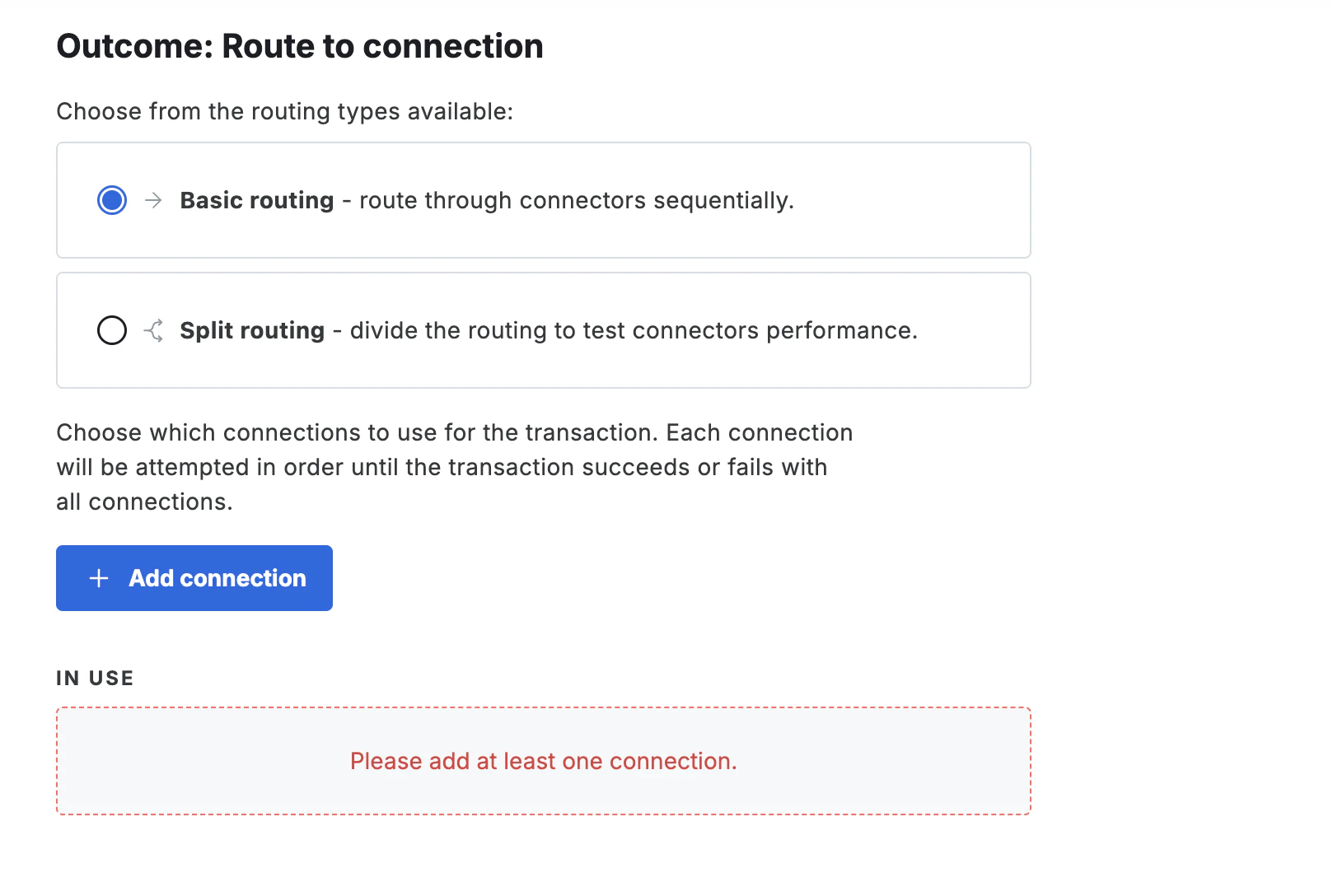 Regardless of routing type, select **Add connection** to add one or more connectors. Connections are tried sequentially within a routing path until the transaction succeeds or all connections have been attempted.
When adding a connection, configure the instrument and message transformation to use —
see [Instruments and message transformations](#instruments-and-message-transformations) for details.
#### Split routing outcome
A split routing outcome distributes matched transactions across one to four variants,
each routed to a different set of connectors. Each variant receives a defined percentage of traffic,
and for each transaction a variant is randomly selected using those weights.
**Configure a split routing outcome**
Open or create a card routing rule, then select **Split routing** as the routing type in the rule outcome section.
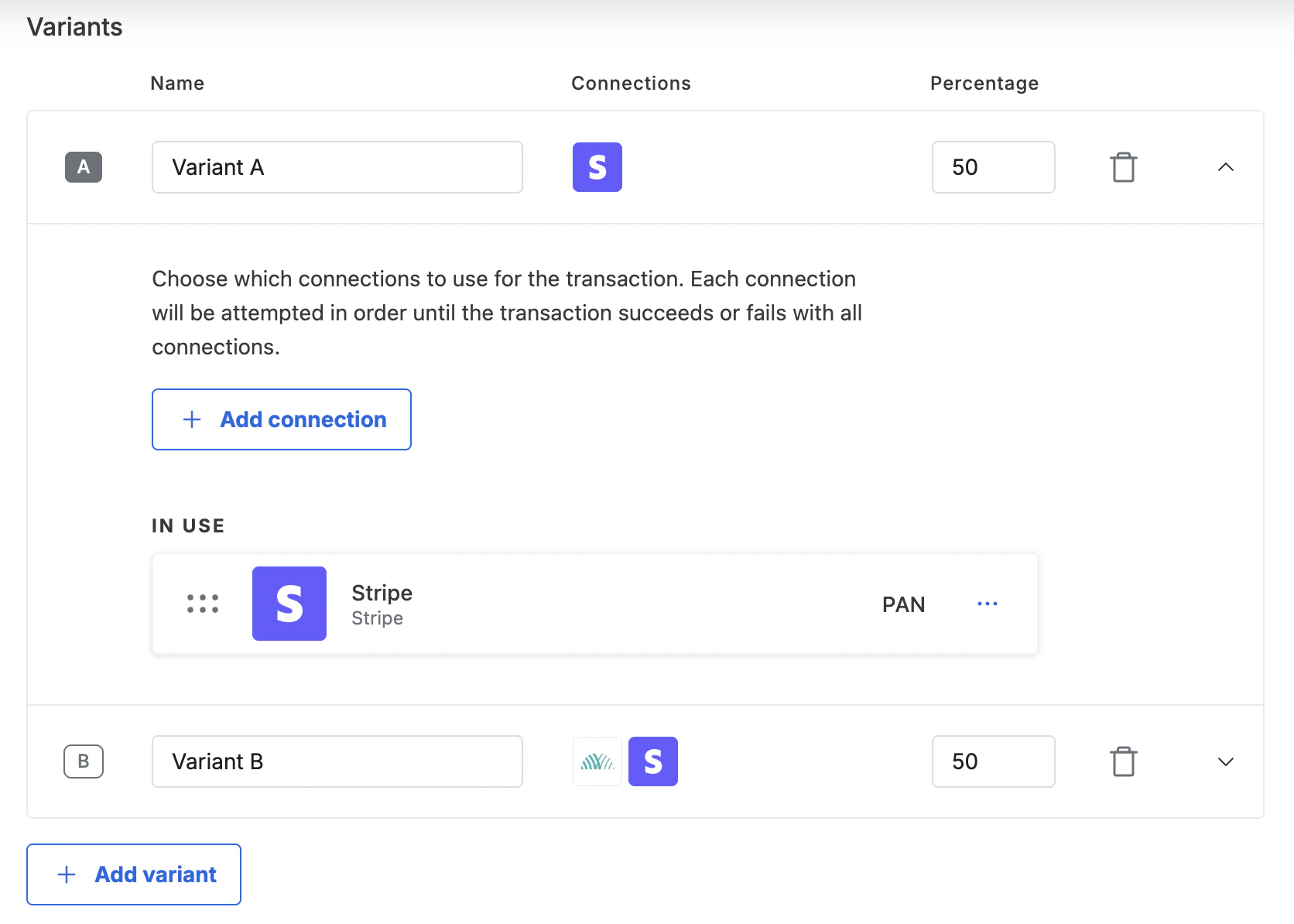
Two variants are created by default — Variant A and Variant B — each set to 50%.
You can configure up to **4 variants** per rule.
The variants table shows a row for each variant with **Name**, **Connections**, and **%** columns. For each variant:
1. **Set a name** — edit the name inline. Use something descriptive, such as "Control" or "Adyen Network Token", so results are easy to read in Insights.
2. **Set the traffic percentage** — enter a whole number in the **%** column. All variant percentages must total exactly 100. The form prevents saving if the total is not met.
3. **Add connections** — click a variant row to expand it, then select **Add connection** to add one or more connectors in your preferred failover order.
Once all variants have at least one connection and percentages total 100%, select **Save**. The rule becomes active immediately.
A variant with no connections causes a validation error. All variants must have at least one connection before the rule can be saved.
**Manage variants**
* **Adjust percentages** — edit the **%** value for any variant and save. Changes take effect immediately on new transactions.
* **Add a variant** — select **Add variant** below the variants table. A new empty variant is created with 0% traffic. Set a name, add connections, and assign a percentage before saving.
* **Remove a variant** — select the **trash** icon on the variant row. Redistribute the remaining percentages to total 100% before saving. You cannot remove the only remaining variant in a rule.
* **Reorder connections** — expand a variant and drag connections to reorder them. The first connection is the primary route; subsequent connections are used as failover.
Regardless of routing type, select **Add connection** to add one or more connectors. Connections are tried sequentially within a routing path until the transaction succeeds or all connections have been attempted.
When adding a connection, configure the instrument and message transformation to use —
see [Instruments and message transformations](#instruments-and-message-transformations) for details.
#### Split routing outcome
A split routing outcome distributes matched transactions across one to four variants,
each routed to a different set of connectors. Each variant receives a defined percentage of traffic,
and for each transaction a variant is randomly selected using those weights.
**Configure a split routing outcome**
Open or create a card routing rule, then select **Split routing** as the routing type in the rule outcome section.
Two variants are created by default — Variant A and Variant B — each set to 50%.
You can configure up to **4 variants** per rule.
The variants table shows a row for each variant with **Name**, **Connections**, and **%** columns. For each variant:
1. **Set a name** — edit the name inline. Use something descriptive, such as "Control" or "Adyen Network Token", so results are easy to read in Insights.
2. **Set the traffic percentage** — enter a whole number in the **%** column. All variant percentages must total exactly 100. The form prevents saving if the total is not met.
3. **Add connections** — click a variant row to expand it, then select **Add connection** to add one or more connectors in your preferred failover order.
Once all variants have at least one connection and percentages total 100%, select **Save**. The rule becomes active immediately.
A variant with no connections causes a validation error. All variants must have at least one connection before the rule can be saved.
**Manage variants**
* **Adjust percentages** — edit the **%** value for any variant and save. Changes take effect immediately on new transactions.
* **Add a variant** — select **Add variant** below the variants table. A new empty variant is created with 0% traffic. Set a name, add connections, and assign a percentage before saving.
* **Remove a variant** — select the **trash** icon on the variant row. Redistribute the remaining percentages to total 100% before saving. You cannot remove the only remaining variant in a rule.
* **Reorder connections** — expand a variant and drag connections to reorder them. The first connection is the primary route; subsequent connections are used as failover.
 **Monitor performance**
Once a rule with a split routing outcome is active, compare variant performance in **Insights** under the **Authorization** tab.
The **Split routing variants** module shows transaction counts, volume, or auth rate broken down by variant name.
From the **Card transactions** rules list, select the **chart icon** next to any split routing rule to open Insights
pre-filtered for that rule's outcome variants.
A variant only appears in Insights once at least one transaction has been processed through it.
**Limits**
| Behavior | Detail |
| :--------------------------------------- | :----------------------------------------------------------------------------- |
| Maximum variants per rule | 4 |
| Minimum percentage per variant | 0% |
| Percentages must total | Exactly 100% |
| Failover scope | Within a single variant only — never across variants |
| Applies to | Card transactions only |
| Insights tab | Authorization tab |
| Historical data after renaming a variant | The new name appears once a new transaction passes through the renamed variant |
| Historical data after deleting a variant | Past data remains visible in Insights even after the variant is deleted |
### **Instruments and message transformations**
The routing framework allows granular rules to be set up by allowing the choice of instrument to be processed with, and how the transaction message is presented to the payment service. The choice of instrument can be combined with the message transformation where available.
#### Instruments
It is currently possible to choose to route transactions using two instruments, PAN, or Network Token. For routing network tokens, network tokens need to be enabled, and the connection needs to support the submission of network tokens. If either of these is not supported, network tokens are not used, and the rule is skipped. If the payment service doesn't support the submission of network tokens, it is not configurable. Setting up a PAN rule as a default is advised.
#### Message transformations
By choosing a message transformation, the presentment of the transaction message towards the payment service can be altered. It is currently possible to override the transaction as an MIT transaction. Please note that using this message transformation should be used with caution. If the business model is inherently not a subscription based model or supportive of any recurring transactions, reprimands can be issued by the card schemes for incorrect flagging of transactions. Sanctions are levied on the acquirer; however, these can be passed through to the merchant.
##### **MIT**
By selecting this transformation, transactions are sent to the payment service as a merchant initiated transaction (MIT).
Please note that this message transformation should be used with caution. If the business model is inherently not a subscription based model, or supportive of any recurring transactions, then reprimands can be issued by the card schemes for incorrect flagging of transactions.
Sanctions are levied on the acquirer; however, these can be passed through to the merchant. If the original transaction is already sent as an MIT, no transformation happens as the original transaction is already an MIT transaction.
##### **Co-badged routing**
This transformation forces the processing of a transaction to use the first additional scheme (co-badged scheme) of the card instead of its main scheme.
If the card doesn't have any co-badged schemes, this transformation is skipped. For example, for a co-badged Visa card that also supports the Cartes Bancaires scheme,
adding this transformation forces the transaction to be processed as Cartes Bancaires. It is important to make sure that co-badged acquiring routes are configured
on the payment service intended to be used.
In general, the following rules apply.
* A rule is skipped if the `intent` is set to `authorise` and the co-badged scheme does not support delayed capture, for example EFTPOS.
* A rule is skipped if the card only supports one known scheme.
* When using 3DS, if the scheme used for the transaction is different to the scheme used to authenticate 3DS, then the 3DS payload is dropped and not used to process the transaction. This is done to prevent triggering 3DS again. Note that currently the 3DS integration does not support most co-badged card schemes.
* Network tokens are currently not supported in combination with co-badged schemed.
* For any payment services that do not rely on the vault but the service's tokens, the token is sent in combination with the additional scheme
* For subsequent transactions that use a network transaction id (scheme reference) to link it to the initial transaction, if the scheme to be used doesn't match the scheme of the ID, then the attempt is skipped, and the next strategy in the rule is attempted.
#### Payment method replacement
For merchants who have the account updater enabled, additional logic
applies after a transaction has been declined.
When the account updater has received new details for a card, but the card hasn't
expired yet, then these new details are left inactive and on standby for future use.
If this card is then used at a later point and the card is declined by a connection,
then the old card details are marked as inactive and the payment
method is updated with the new card details from the account updater. The transaction is
subsequently retried with the new details with the same connection. This retry is
applied outside of any retries that are configured as part of Flow.
## Action: 3-D Secure
This action allows control over when 3-D Secure is required for
transactions.
Some card issuers mandate authentication regardless of this rule. For a card
whose issuer requires it, Gr4vy attempts 3-D Secure even when a rule skips it.
A rule that forces 3-D Secure, and a connection with 3-D Secure turned off, are
unaffected. See [Issuer-mandated 3-D Secure](/guides/features/3ds/overview#issuer-mandated-3-d-secure).
## Conditions
The following conditions can be added:
* Amount: This enables filtering based on the amount for the transaction. Each
rule defines a single currency for which it applies. A minimum
amount, maximum amount, or a range for the amount can be specified.
* Anti-fraud decision: This enables filtering based on a risk decision received
from an anti-fraud provider as an inclusive or exclusive list of decisions.
Note that Error (unable to get decision) represents a state where a decision
is unobtainable. For example, due to a network timeout or server error.
* Browser language: This enables filtering based on a buyer's browser language.
* BIN range: This enables filtering on up to the first eight digits of the card,
for example: `4242-4545` or `12345678-12345678`.
* Card country: This enables filtering based on the country of the card as an
inclusive or exclusive list of countries.
* Card issuer name: This enables filtering based on the issuer name of the card, for
example: `Bank of America NA` or `HSBC Continental Europe`. It can be filtered by
a part of the name.
* Card product name: This enables filtering based on the card product name, for
example: `Visa Platinum` or `MasterCard Black`. It can be filtered by a part of
the name.
* Card scheme: This enables filtering based on the scheme of the card as an
inclusive or exclusive list of schemes.
* Card source: This enables filtering based on the input used for the card, for
example: Apple Pay, Google Pay, tokenized, or one-off card details.
* Card type: This enables filtering based on the type of the card as an
inclusive or exclusive list of types.
* Country: This enables filtering based on the customer's country as an
inclusive or exclusive list of countries.
* Currency: This enables filtering based on the transaction currency as an
inclusive or exclusive list of currencies.
* Gift card BIN range: This enables filtering on up to the first nine digits of a gift
card, for example: `4242-4545` or `123456789-123456789`.
* Has gift cards: This enables filtering based on whether gift cards were used
in the transaction.
* Is subsequent payment: This enables filtering based on the transaction's
`is_subsequent_payment` flag value, set to either `true` or `false`.
* Merchant initiated: This enables filtering based on the transaction's
`merchant_initiated` flag value, set to either `true` or `false`.
* Metadata: This enables filtering based on key/value strings from an object
passed to the API. This currently only supports matching/not matching
string values. For example, `{"foo": "bar"}` could be passed and a
condition created based on the value of the `foo` key.
* Metadata (Numeric): This enables filtering based on key/value numeric strings
from an object passed to the API. It only supports numeric comparisons like
`less than`, `equal to`, `greater than`, `greater than or equal to` and
`less than or equal to`.
For example, `{"foo": "200.1"}` could be passed and a condition created based
on the numeric value `200.1` of the `foo` key.
* Payment source: This enables filtering based on the transaction payment
source as an inclusive or exclusive list of payment sources.
* Product categories: This enables filtering based on the product categories
of cart items.
* Product types: This enables filtering based on the product types of cart
items.
* SKUs: This enables filtering based on the SKUs of cart items.
* Split routing: This enables filtering based on set probability (percentage),
for example, setting `30` would evaluate to true for approximately 30% of requests.
**Rule Validation**
* You may only have one amount or currency condition per rule
* You may only have one browser language condition per rule
* You may only have one BIN range condition per rule
* You may only have one card country condition per rule
* You may only have one card scheme condition per rule
* You may only have one card source condition per rule
* You may only have one card type condition per rule
* You may only have one country condition per rule
* You may only have one currency condition per rule
* You may only have one gift card BIN range condition per rule
* You may only have one has gift cards condition per rule
* You may only have one is subsequent payment condition per rule
* You may only have one merchant initiated condition per rule
* You may only have one payment source condition per rule
* You may only have one product categories condition per rule
* You may only have one product types condition per rule
* You may only have one SKUs condition per rule
* You may only have one Split Routing condition per rule
**Monitor performance**
Once a rule with a split routing outcome is active, compare variant performance in **Insights** under the **Authorization** tab.
The **Split routing variants** module shows transaction counts, volume, or auth rate broken down by variant name.
From the **Card transactions** rules list, select the **chart icon** next to any split routing rule to open Insights
pre-filtered for that rule's outcome variants.
A variant only appears in Insights once at least one transaction has been processed through it.
**Limits**
| Behavior | Detail |
| :--------------------------------------- | :----------------------------------------------------------------------------- |
| Maximum variants per rule | 4 |
| Minimum percentage per variant | 0% |
| Percentages must total | Exactly 100% |
| Failover scope | Within a single variant only — never across variants |
| Applies to | Card transactions only |
| Insights tab | Authorization tab |
| Historical data after renaming a variant | The new name appears once a new transaction passes through the renamed variant |
| Historical data after deleting a variant | Past data remains visible in Insights even after the variant is deleted |
### **Instruments and message transformations**
The routing framework allows granular rules to be set up by allowing the choice of instrument to be processed with, and how the transaction message is presented to the payment service. The choice of instrument can be combined with the message transformation where available.
#### Instruments
It is currently possible to choose to route transactions using two instruments, PAN, or Network Token. For routing network tokens, network tokens need to be enabled, and the connection needs to support the submission of network tokens. If either of these is not supported, network tokens are not used, and the rule is skipped. If the payment service doesn't support the submission of network tokens, it is not configurable. Setting up a PAN rule as a default is advised.
#### Message transformations
By choosing a message transformation, the presentment of the transaction message towards the payment service can be altered. It is currently possible to override the transaction as an MIT transaction. Please note that using this message transformation should be used with caution. If the business model is inherently not a subscription based model or supportive of any recurring transactions, reprimands can be issued by the card schemes for incorrect flagging of transactions. Sanctions are levied on the acquirer; however, these can be passed through to the merchant.
##### **MIT**
By selecting this transformation, transactions are sent to the payment service as a merchant initiated transaction (MIT).
Please note that this message transformation should be used with caution. If the business model is inherently not a subscription based model, or supportive of any recurring transactions, then reprimands can be issued by the card schemes for incorrect flagging of transactions.
Sanctions are levied on the acquirer; however, these can be passed through to the merchant. If the original transaction is already sent as an MIT, no transformation happens as the original transaction is already an MIT transaction.
##### **Co-badged routing**
This transformation forces the processing of a transaction to use the first additional scheme (co-badged scheme) of the card instead of its main scheme.
If the card doesn't have any co-badged schemes, this transformation is skipped. For example, for a co-badged Visa card that also supports the Cartes Bancaires scheme,
adding this transformation forces the transaction to be processed as Cartes Bancaires. It is important to make sure that co-badged acquiring routes are configured
on the payment service intended to be used.
In general, the following rules apply.
* A rule is skipped if the `intent` is set to `authorise` and the co-badged scheme does not support delayed capture, for example EFTPOS.
* A rule is skipped if the card only supports one known scheme.
* When using 3DS, if the scheme used for the transaction is different to the scheme used to authenticate 3DS, then the 3DS payload is dropped and not used to process the transaction. This is done to prevent triggering 3DS again. Note that currently the 3DS integration does not support most co-badged card schemes.
* Network tokens are currently not supported in combination with co-badged schemed.
* For any payment services that do not rely on the vault but the service's tokens, the token is sent in combination with the additional scheme
* For subsequent transactions that use a network transaction id (scheme reference) to link it to the initial transaction, if the scheme to be used doesn't match the scheme of the ID, then the attempt is skipped, and the next strategy in the rule is attempted.
#### Payment method replacement
For merchants who have the account updater enabled, additional logic
applies after a transaction has been declined.
When the account updater has received new details for a card, but the card hasn't
expired yet, then these new details are left inactive and on standby for future use.
If this card is then used at a later point and the card is declined by a connection,
then the old card details are marked as inactive and the payment
method is updated with the new card details from the account updater. The transaction is
subsequently retried with the new details with the same connection. This retry is
applied outside of any retries that are configured as part of Flow.
## Action: 3-D Secure
This action allows control over when 3-D Secure is required for
transactions.
Some card issuers mandate authentication regardless of this rule. For a card
whose issuer requires it, Gr4vy attempts 3-D Secure even when a rule skips it.
A rule that forces 3-D Secure, and a connection with 3-D Secure turned off, are
unaffected. See [Issuer-mandated 3-D Secure](/guides/features/3ds/overview#issuer-mandated-3-d-secure).
## Conditions
The following conditions can be added:
* Amount: This enables filtering based on the amount for the transaction. Each
rule defines a single currency for which it applies. A minimum
amount, maximum amount, or a range for the amount can be specified.
* Anti-fraud decision: This enables filtering based on a risk decision received
from an anti-fraud provider as an inclusive or exclusive list of decisions.
Note that Error (unable to get decision) represents a state where a decision
is unobtainable. For example, due to a network timeout or server error.
* Browser language: This enables filtering based on a buyer's browser language.
* BIN range: This enables filtering on up to the first eight digits of the card,
for example: `4242-4545` or `12345678-12345678`.
* Card country: This enables filtering based on the country of the card as an
inclusive or exclusive list of countries.
* Card issuer name: This enables filtering based on the issuer name of the card, for
example: `Bank of America NA` or `HSBC Continental Europe`. It can be filtered by
a part of the name.
* Card product name: This enables filtering based on the card product name, for
example: `Visa Platinum` or `MasterCard Black`. It can be filtered by a part of
the name.
* Card scheme: This enables filtering based on the scheme of the card as an
inclusive or exclusive list of schemes.
* Card source: This enables filtering based on the input used for the card, for
example: Apple Pay, Google Pay, tokenized, or one-off card details.
* Card type: This enables filtering based on the type of the card as an
inclusive or exclusive list of types.
* Country: This enables filtering based on the customer's country as an
inclusive or exclusive list of countries.
* Currency: This enables filtering based on the transaction currency as an
inclusive or exclusive list of currencies.
* Gift card BIN range: This enables filtering on up to the first nine digits of a gift
card, for example: `4242-4545` or `123456789-123456789`.
* Has gift cards: This enables filtering based on whether gift cards were used
in the transaction.
* Is subsequent payment: This enables filtering based on the transaction's
`is_subsequent_payment` flag value, set to either `true` or `false`.
* Merchant initiated: This enables filtering based on the transaction's
`merchant_initiated` flag value, set to either `true` or `false`.
* Metadata: This enables filtering based on key/value strings from an object
passed to the API. This currently only supports matching/not matching
string values. For example, `{"foo": "bar"}` could be passed and a
condition created based on the value of the `foo` key.
* Metadata (Numeric): This enables filtering based on key/value numeric strings
from an object passed to the API. It only supports numeric comparisons like
`less than`, `equal to`, `greater than`, `greater than or equal to` and
`less than or equal to`.
For example, `{"foo": "200.1"}` could be passed and a condition created based
on the numeric value `200.1` of the `foo` key.
* Payment source: This enables filtering based on the transaction payment
source as an inclusive or exclusive list of payment sources.
* Product categories: This enables filtering based on the product categories
of cart items.
* Product types: This enables filtering based on the product types of cart
items.
* SKUs: This enables filtering based on the SKUs of cart items.
* Split routing: This enables filtering based on set probability (percentage),
for example, setting `30` would evaluate to true for approximately 30% of requests.
**Rule Validation**
* You may only have one amount or currency condition per rule
* You may only have one browser language condition per rule
* You may only have one BIN range condition per rule
* You may only have one card country condition per rule
* You may only have one card scheme condition per rule
* You may only have one card source condition per rule
* You may only have one card type condition per rule
* You may only have one country condition per rule
* You may only have one currency condition per rule
* You may only have one gift card BIN range condition per rule
* You may only have one has gift cards condition per rule
* You may only have one is subsequent payment condition per rule
* You may only have one merchant initiated condition per rule
* You may only have one payment source condition per rule
* You may only have one product categories condition per rule
* You may only have one product types condition per rule
* You may only have one SKUs condition per rule
* You may only have one Split Routing condition per rule