> ## Documentation Index
> Fetch the complete documentation index at: https://docs.gr4vy.com/llms.txt
> Use this file to discover all available pages before exploring further.

# USAePay - Card

> Connect to USAePay to accept credit and debit card payments.

export const connector = {
  displayName: "USAePay",
  method: "card",
  features: "create_token create_transaction deep_linking delayed_capture partial_capture partial_refunds payment_method_tokenization refunds transaction_sync verify_credentials void",
  supportedCountries: "US",
  supportedCurrencies: "USD"
};

export const ConnectorRegions = ({data, kind, name: nameOverride}) => {
  const [query, setQuery] = useState("");
  const [open, setOpen] = useState(false);
  const isCountries = kind === "countries";
  const raw = data && (isCountries ? data.supportedCountries : data.supportedCurrencies);
  const codes = typeof raw === "string" ? raw.split(/\s+/).filter(Boolean) : Array.isArray(raw) ? raw : [];
  const DISPLAY_NAME_OVERRIDES = {
    authorizenet: "Authorize.net",
    cardpointe: "Fiserv CardPointe",
    dlocal: "dLocal",
    shift4i4go: "Shift4 i4go",
    tokenex: "TokenEx"
  };
  const rawName = data && data.displayName || "";
  const name = nameOverride || DISPLAY_NAME_OVERRIDES[rawName.toLowerCase()] || rawName || "This connector";
  const verb = isCountries ? "supports transactions from buyers in" : "supports processing payments in";
  const noun = isCountries ? "countries" : "currencies";
  if (codes.length === 0) return null;
  let displayNames = null;
  try {
    displayNames = new Intl.DisplayNames(["en"], {
      type: isCountries ? "region" : "currency"
    });
  } catch (e) {
    displayNames = null;
  }
  const resolve = code => {
    if (!displayNames) return null;
    try {
      const resolved = displayNames.of(code);
      return resolved && resolved !== code ? resolved : null;
    } catch (e) {
      return null;
    }
  };
  const MAJOR_CURRENCIES = ["USD", "EUR", "GBP", "CAD", "AUD", "JPY", "CHF", "CNY", "SGD", "HKD", "NZD", "SEK", "NOK", "DKK", "MXN", "BRL", "INR"];
  const items = codes.map(code => ({
    code,
    label: resolve(code)
  }));
  if (isCountries) {
    items.sort((a, b) => (a.label || a.code).localeCompare(b.label || b.code));
  } else {
    const rank = code => {
      const i = MAJOR_CURRENCIES.indexOf(code);
      return i === -1 ? MAJOR_CURRENCIES.length : i;
    };
    items.sort((a, b) => rank(a.code) - rank(b.code) || a.code.localeCompare(b.code));
  }
  if (codes.length <= 3) {
    const parts = items.map(it => isCountries || !it.label ? it.label || it.code : `${it.label} (${it.code})`);
    const joined = parts.length === 1 ? parts[0] : parts.length === 2 ? `${parts[0]} and ${parts[1]}` : `${parts.slice(0, -1).join(", ")}, and ${parts[parts.length - 1]}`;
    return <p>
        {name} {verb} {joined}.
      </p>;
  }
  const chipStyle = {
    display: "inline-flex",
    alignItems: "baseline",
    gap: "0.4rem",
    padding: "0.15rem 0.55rem",
    borderRadius: "0.375rem",
    border: "1px solid rgba(128, 128, 128, 0.25)",
    fontSize: "0.875rem",
    lineHeight: 1.5
  };
  const codeStyle = {
    fontFamily: "var(--font-mono, ui-monospace, monospace)",
    fontWeight: 600,
    fontSize: "0.8125rem"
  };
  const controlStyle = {
    color: "inherit",
    background: "transparent",
    border: "1px solid rgba(128, 128, 128, 0.3)",
    borderRadius: "0.5rem",
    fontSize: "0.875rem"
  };
  const renderChip = it => <span key={it.code} style={chipStyle} title={isCountries ? it.code : it.label || it.code}>
      {isCountries ? it.label || it.code : <span style={codeStyle}>{it.code}</span>}
      {!isCountries && it.label ? <span style={{
    opacity: 0.7
  }}>{it.label}</span> : null}
    </span>;
  const PREVIEW = 5;
  const collapsible = items.length > PREVIEW;
  const q = query.trim().toLowerCase();
  const filtered = q ? items.filter(it => it.code.toLowerCase().includes(q) || it.label && it.label.toLowerCase().includes(q)) : items;
  const expanded = open || q !== "";
  const visible = !collapsible ? items : expanded ? filtered : items.slice(0, PREVIEW);
  const toggle = () => {
    const next = !open;
    setOpen(next);
    if (!next) setQuery("");
  };
  return <div>
      <p>
        {name} {verb} the following {codes.length} {noun}:
      </p>

      {collapsible ? <input type="text" value={query} onChange={e => setQuery(e.target.value)} placeholder={`Filter ${noun}…`} aria-label={`Filter ${noun}`} style={{
    ...controlStyle,
    display: "block",
    width: "100%",
    maxWidth: "22rem",
    padding: "0.4rem 0.7rem",
    margin: "0 0 0.75rem"
  }} /> : null}

      <div style={{
    display: "flex",
    flexWrap: "wrap",
    gap: "0.4rem"
  }}>
        {visible.map(renderChip)}
      </div>

      {q && filtered.length === 0 ? <p style={{
    opacity: 0.7,
    marginTop: "0.6rem"
  }}>
          No {noun} match “{query.trim()}”.
        </p> : null}
      {q && filtered.length > 0 ? <p style={{
    opacity: 0.6,
    fontSize: "0.8125rem",
    marginTop: "0.6rem"
  }}>
          Showing {filtered.length} of {items.length}.
        </p> : null}

      {collapsible && !q ? <button type="button" aria-expanded={open} onClick={toggle} style={{
    ...controlStyle,
    display: "inline-flex",
    alignItems: "center",
    gap: "0.4rem",
    padding: "0.35rem 0.75rem",
    marginTop: "0.75rem",
    cursor: "pointer"
  }}>
          <span aria-hidden="true" style={{
    display: "inline-block",
    transform: open ? "rotate(90deg)" : "none",
    transition: "transform 0.15s ease"
  }}>
            ›
          </span>
          {open ? "Show fewer" : `and ${items.length - PREVIEW} more`}
        </button> : null}
    </div>;
};

export const ConnectorCapabilities = ({data}) => {
  const CAPABILITIES = [{
    keys: ["three_d_secure_hosted"],
    label: "3-D Secure (hosted)",
    description: "Gr4vy-hosted 3DS authentication flow.",
    cardOnly: true
  }, {
    keys: ["three_d_secure_pass_through"],
    label: "3-D Secure (pass-through)",
    description: "Pass through 3DS data authenticated by a third party.",
    cardOnly: true
  }, {
    keys: ["partial_authorization"],
    label: "Partial authorization",
    description: "Support partial approval responses."
  }, {
    keys: ["zero_auth"],
    label: "Zero auth",
    description: "Verify a card without charging it."
  }, {
    keys: ["void"],
    label: "Void",
    description: "Cancel an authorized transaction before capture."
  }, {
    keys: ["direct_capture"],
    label: "Direct capture",
    description: "Capture a payment immediately at authorization.",
    hideWhenUnsupported: true
  }, {
    keys: ["delayed_capture"],
    label: "Delayed capture",
    description: "Authorize a payment and capture it at a later time."
  }, {
    keys: ["partial_capture"],
    label: "Partial capture",
    description: "Capture a portion of the authorized amount."
  }, {
    keys: ["over_capture"],
    label: "Over capture",
    description: "Capture more than the originally authorized amount."
  }, {
    keys: ["refunds"],
    label: "Refunds",
    description: "Refund a captured payment."
  }, {
    keys: ["partial_refunds"],
    label: "Partial refunds",
    description: "Refund a portion of the captured amount."
  }, {
    keys: ["settlement_reporting"],
    label: "Settlement reporting",
    description: "Automatic settlement and reconciliation reporting."
  }, {
    keys: ["create_session"],
    label: "Create session",
    description: "Create a connector session for client-side flows."
  }, {
    keys: ["network_tokens_default", "network_tokens_toggle"],
    label: "Network tokens",
    description: "Network-level tokenization for improved approval rates.",
    cardOnly: true
  }, {
    keys: ["digital_wallets"],
    label: "Digital wallets",
    description: "Apple Pay, Google Pay, and other wallet integrations."
  }, {
    keys: ["payment_method_tokenization", "payment_method_tokenization_toggle"],
    label: "Payment method tokenization",
    description: "Store payment methods outside of transactions."
  }, {
    keys: ["transaction_sync"],
    label: "Transaction sync",
    description: "Synchronize transaction state from the connector."
  }, {
    keys: ["create_token"],
    label: "Tokenization",
    description: "Create a token from card details collected via Secure Fields.",
    hideWhenUnsupported: true
  }, {
    keys: ["delete_token"],
    label: "Delete token",
    description: "Delete a stored token.",
    hideWhenUnsupported: true
  }, {
    keys: ["verify_credentials"],
    label: "Verify credentials",
    description: "Validate the configured credentials against the connector.",
    hideWhenUnsupported: true
  }];
  const raw = data && data.features;
  const enabled = typeof raw === "string" ? new Set(raw.split(/\s+/).filter(Boolean)) : Array.isArray(raw) ? new Set(raw) : new Set(Object.keys(raw || ({})).filter(key => raw[key]));
  const isOn = entry => entry.keys.some(key => enabled.has(key));
  const isNonCard = data && data.method && data.method !== "card";
  const renderGroup = (title, entries, supported) => {
    if (entries.length === 0) return null;
    const mark = supported ? "✓" : "✕";
    const markColor = supported ? "#16a34a" : "#9ca3af";
    return <div style={{
      marginTop: "1rem"
    }}>
        <div style={{
      fontSize: "0.75rem",
      fontWeight: 600,
      letterSpacing: "0.05em",
      textTransform: "uppercase",
      opacity: 0.6,
      marginBottom: "0.25rem"
    }}>
          {title}
        </div>
        {}
        <div role="list">
          {entries.map(entry => <div role="listitem" key={entry.label} style={{
      display: "flex",
      gap: "0.5rem",
      alignItems: "baseline",
      padding: "0.3rem 0",
      opacity: supported ? 1 : 0.7
    }}>
              <span aria-hidden="true" style={{
      color: markColor,
      fontWeight: 700,
      flexShrink: 0
    }}>
                {mark}
              </span>
              <span>
                <strong>{entry.label}</strong>
                {entry.description ? <span style={{
      opacity: 0.85
    }}> — {entry.description}</span> : null}
              </span>
            </div>)}
        </div>
      </div>;
  };
  const visible = isNonCard ? CAPABILITIES.filter(entry => !entry.cardOnly) : CAPABILITIES;
  const supported = visible.filter(isOn);
  const unsupported = visible.filter(entry => !isOn(entry) && !entry.hideWhenUnsupported);
  return <div>
      {renderGroup("Supported", supported, true)}
      {renderGroup("Not supported", unsupported, false)}
    </div>;
};

USAePay is a US-based card payment gateway owned by NMI, providing secure
payment processing solutions for merchants in the United States.

## Setup

USAePay provides a self-service sign-up for a sandbox account. To sign up for
an account, visit the [sign-up
page](https://developer.usaepay.com/_developer/app/register) and create an
account.

## Credentials

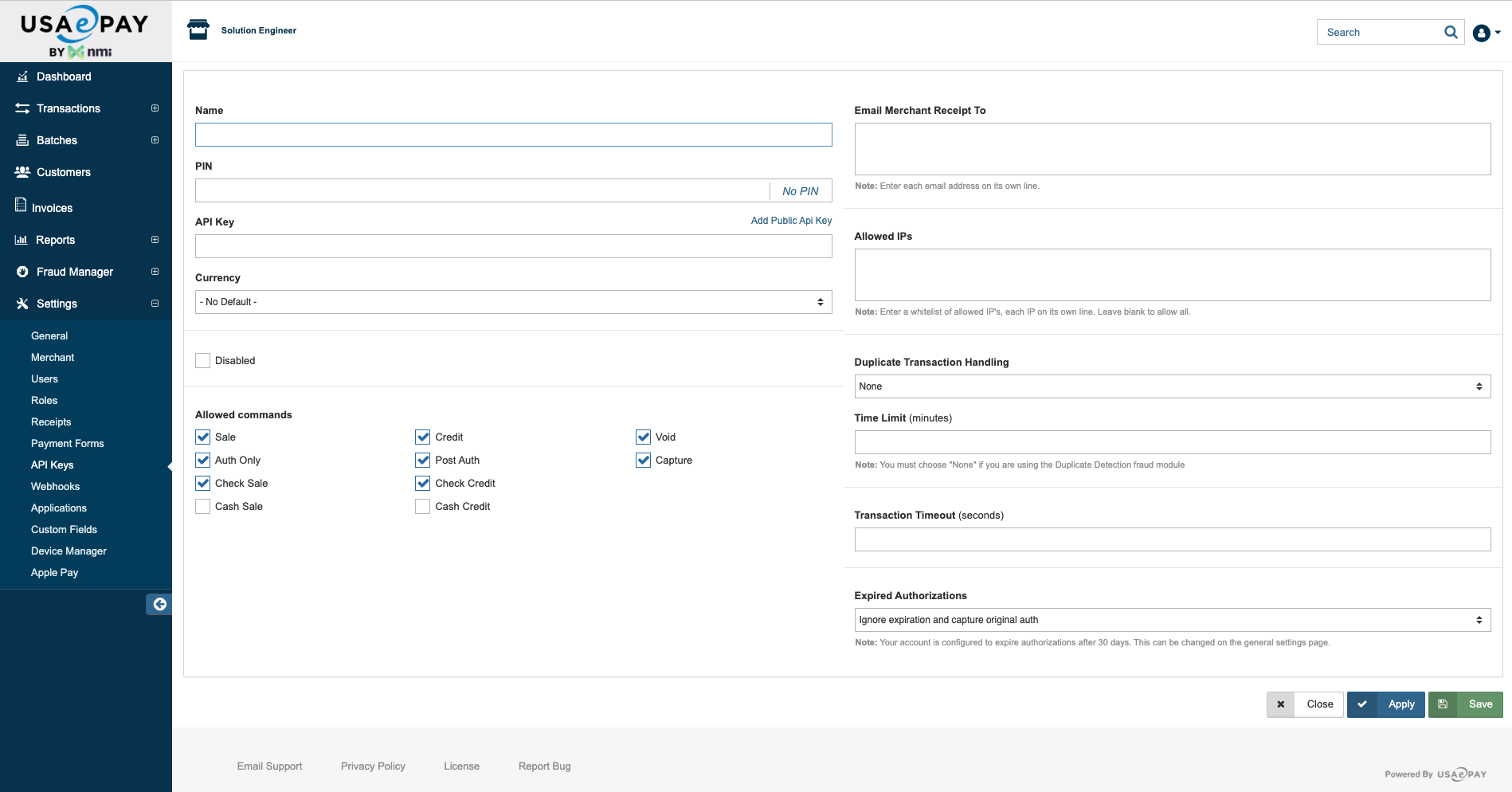
Configure the following credentials in the Gr4vy dashboard, which are obtained
from your USAePay administrator portal under **Settings** → **API Keys**:

* **API Key** - Your USAePay API key for authentication
* **PIN** - Your USAePay PIN for API access
* **Webhook Signature Key** (optional) - Your webhook signature key for
  verifying webhook authenticity

<Frame>
  <img src="https://mintcdn.com/gr4vy/YjfuwBe-3Nu3A-GT/connections/assets/usaepay_api_key.png?fit=max&auto=format&n=YjfuwBe-3Nu3A-GT&q=85&s=615c36a169a27eaf46c7e75d2433200f" alt="USAePay API Key" width="1898" height="994" data-path="connections/assets/usaepay_api_key.png" />
</Frame>

## Connector configuration

After setting up your USAePay connector in the dashboard, configure how
transactions are routed to it. Choose one of the following options:

* **Using Flow** - Configure USAePay as the target connector in
  [Flow](/guides/dashboard/flow/overview) to automatically route card
  transactions to this connector
* **Using the API** - Explicitly set the `payment_service_id` parameter to the
  USAePay connector ID when creating transactions. This overrides any Flow
  routing rules.

The connector ID can be found in the dashboard under **Connections** ->
**Configured connections**.

## Capabilities
<ConnectorCapabilities data={connector} />

## Supported countries

<ConnectorRegions data={connector} kind="countries" />

## Supported currencies

<ConnectorRegions data={connector} kind="currencies" />

## Limitations

* **Refunds before settlement** - Captured transactions cannot be refunded until
  they are settled. Voiding a transaction before settlement is not currently
  supported.

<Note>
  This is a closed-loop connector. Some failover scenarios are limited. For
  details, see [Open-loop versus
  closed-loop](/guides/features/recurring-payments/open-loop).
</Note>

## Integration

To accept card payments with USAePay, use one of Gr4vy's client-side
integration methods to securely collect card details. Due to PCI compliance
requirements, card data should never be sent directly to your servers.

You can integrate using:

* **[Embed](/guides/payments/embed/quick-start)** - A pre-built, customizable
  payment form that handles the complete payment flow
* **[Secure Fields](/guides/payments/secure-fields/quick-start)** - Embed card
  input fields for building custom payment forms while maintaining PCI
  compliance
* **[Mobile SDKs](/guides/get-started#sdks-and-plugins)** - Native SDKs for
  iOS, Android, React Native, and other platforms

These methods handle card data collection and tokenization. Once the card
details are collected and tokenized, create a transaction through the Gr4vy API,
which automatically routes the payment to your configured USAePay connection
based on your Flow rules or explicit `payment_service_id` parameter.

## Webhooks

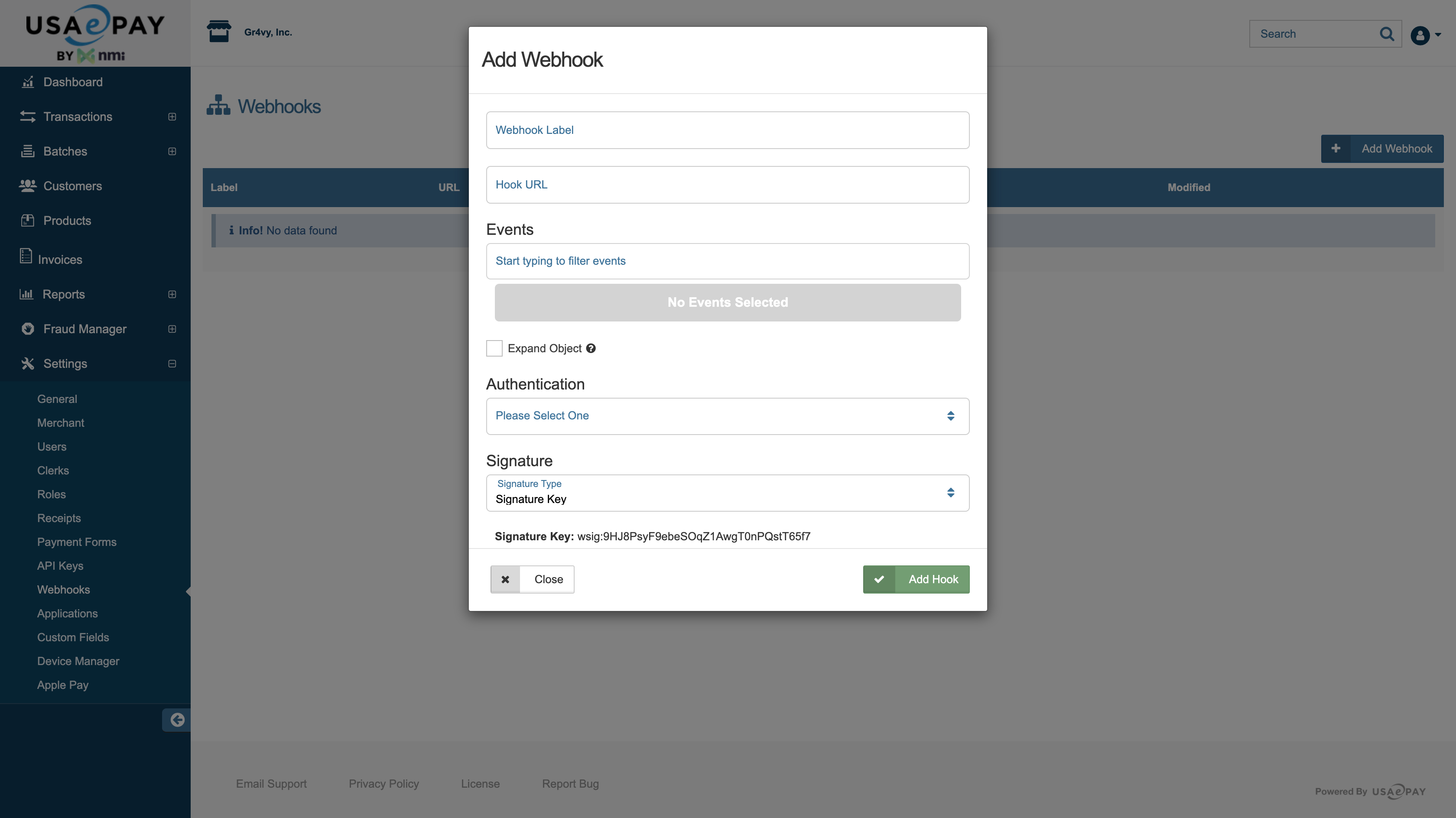
Webhooks need to be configured in the USAePay administrator portal under
**Settings** → **Webhooks**. Copy the webhook subscription URL from the Gr4vy
dashboard and add it to the **Hook URL** field in the USAePay webhook
configuration.

<Frame>
  <img src="https://mintcdn.com/gr4vy/YjfuwBe-3Nu3A-GT/connections/assets/usaepay_webhook_configuration.png?fit=max&auto=format&n=YjfuwBe-3Nu3A-GT&q=85&s=da5b62ea71adcae6b9df47e2b39283ba" alt="USAePay Webhook Configuration" width="3360" height="1888" data-path="connections/assets/usaepay_webhook_configuration.png" />
</Frame>

If webhook signature verification is desired, enable this in the USAePay webhook
configuration. Copy the **Signature Key** from the bottom of the webhook
configuration window in USAePay's administrator portal, and provide this value
in the **Webhook Signature Key** field when configuring the connector
credentials in the Gr4vy dashboard.

### Idempotency

USAePay supports idempotent retries, but this must be configured in the USAePay
administrator portal and is linked directly to the API key. By default, the
**Duplicate Transaction Handling** field is set to `None`. There are 3 options
to choose from, and only the **Signature Key** option is supported by Gr4vy.
There is also a **Time Limit** field that allows you to set a limit for
evaluating duplicate transactions.