> ## Documentation Index
> Fetch the complete documentation index at: https://docs.gr4vy.com/llms.txt
> Use this file to discover all available pages before exploring further.

# NMI - Card

> Connect to NMI to accept card payments.

NMI (Network Merchants Inc.) is a payment gateway provider offering secure card
processing solutions for merchants worldwide. NMI provides flexible payment
processing with extensive integration options and support for multiple payment
types.

## Setup

NMI provides a self-service sign-up for a sandbox account. To sign up for an
account, visit the [sign-up
page](https://guide.nmi.com/app/magic-login?mode=signup) and create an account.

## Connector configuration

After signing up with NMI, you can configure the connector in Gr4vy using one of
the following methods:

* **[Flow](/guides/dashboard/flow)** - Configure payment routing rules through
  your Gr4vy dashboard
* **[API integration](/guides/payments/direct-api/quick-start/overview)** - Specify the
  `payment_service_id` when creating transactions to explicitly route payments
  to this connector

## Credentials

Configure the following credentials in the Gr4vy dashboard, which are obtained
from your NMI administrator portal:

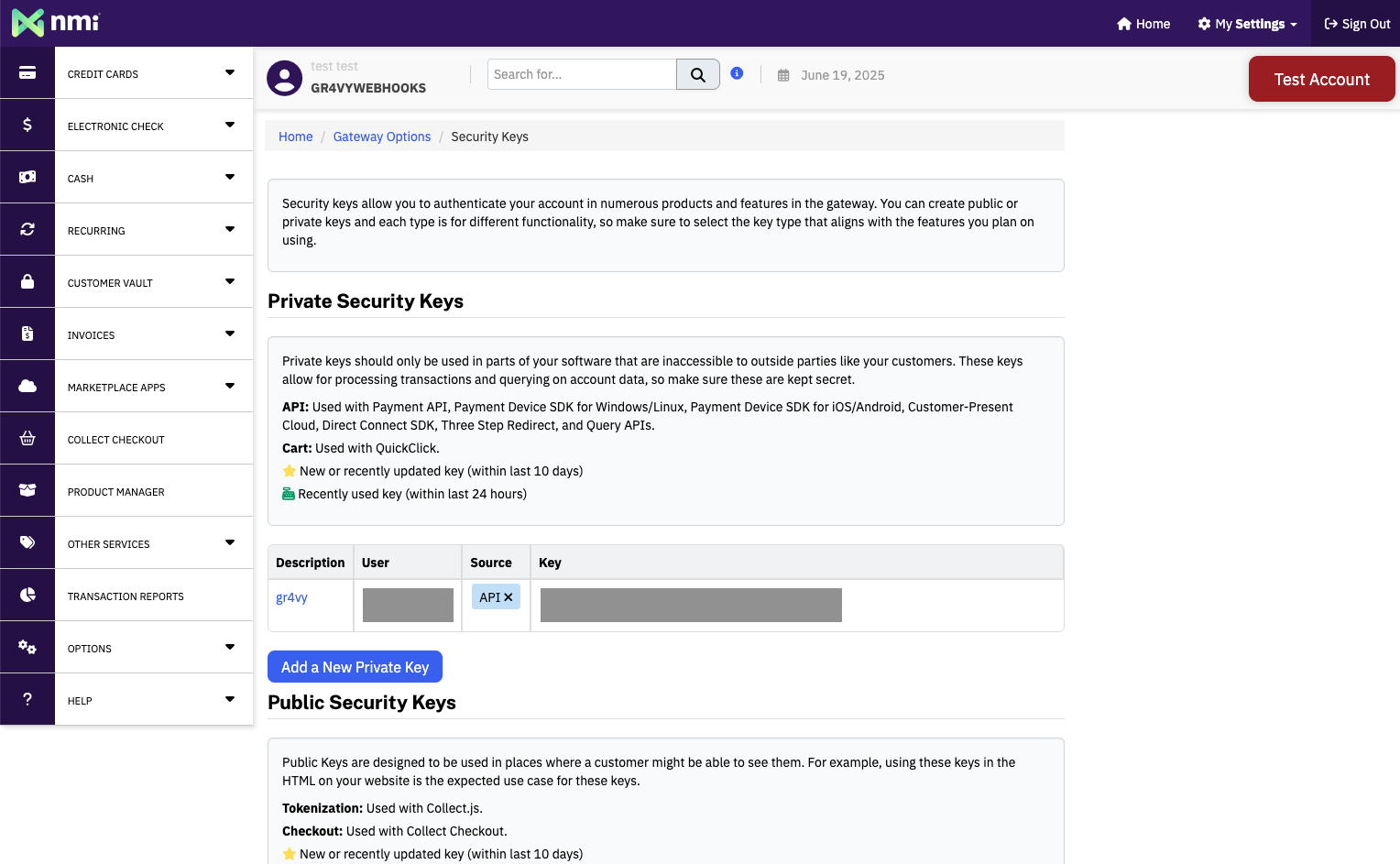
* **API Key** - Your NMI security key, found in the NMI administrator portal
  under **Options** → **Settings** → **Security keys**

<Frame>
  <img src="https://mintcdn.com/gr4vy/YjfuwBe-3Nu3A-GT/connections/assets/nmi_security_key.png?fit=max&auto=format&n=YjfuwBe-3Nu3A-GT&q=85&s=b7d397c316587dad012801b31b3aad56" alt="NMI Security Key" width="1528" height="943" data-path="connections/assets/nmi_security_key.png" />
</Frame>

## Features

NMI supports the following features:

* **Delayed capture** - Authorize a payment and capture it at a later time
* **Partial capture** - Capture a portion of the authorized amount
* **Partial refunds** - Refund a portion of the captured amount
* **Refunds** - Refund a captured payment
* **Void** - Cancel an authorized transaction before capture
* **Zero auth** - Verify a card without charging it
* **Digital wallets** - Support for Apple Pay, Google Pay, and other wallet
  integrations
* **Payment method tokenization** - Store payment methods for future use outside
  of transactions
* **3-D Secure** - Pass-through 3DS authentication
* **Open loop (optional)** - Open-loop card processing can be enabled if
  supported by your NMI account

## Supported countries

NMI supports transactions from buyers in the following countries:

| Country code | Country code | Country code | Country code | Country code | Country code | Country code | Country code |
| ------------ | ------------ | ------------ | ------------ | ------------ | ------------ | ------------ | ------------ |
| `AE`         | `AR`         | `AT`         | `BE`         | `BO`         | `BR`         | `CA`         | `CH`         |
| `CL`         | `CN`         | `CO`         | `CY`         | `DE`         | `DK`         | `EE`         | `ES`         |
| `FI`         | `FR`         | `GB`         | `GR`         | `HK`         | `ID`         | `IL`         | `IN`         |
| `IT`         | `JP`         | `KR`         | `LT`         | `LU`         | `LV`         | `MT`         | `MX`         |
| `MY`         | `NL`         | `NO`         | `NZ`         | `PE`         | `PH`         | `PL`         | `PT`         |
| `PY`         | `RU`         | `SE`         | `SG`         | `SI`         | `SK`         | `TH`         | `TR`         |
| `TW`         | `US`         | `ZA`         |              |              |              |              |              |

## Supported currencies

NMI supports processing payments in the following currencies:

| Currency code | Currency code | Currency code | Currency code | Currency code | Currency code | Currency code | Currency code |
| ------------- | ------------- | ------------- | ------------- | ------------- | ------------- | ------------- | ------------- |
| `AED`         | `ARS`         | `AUD`         | `BOB`         | `BRL`         | `CAD`         | `CHF`         | `CLP`         |
| `CNY`         | `COP`         | `DKK`         | `EUR`         | `GBP`         | `HKD`         | `IDR`         | `ILS`         |
| `INR`         | `JPY`         | `KRW`         | `MXN`         | `MYR`         | `NOK`         | `NZD`         | `PEN`         |
| `PHP`         | `PLN`         | `PYG`         | `RUB`         | `SEK`         | `SGD`         | `THB`         | `TRY`         |
| `TWD`         | `USD`         | `ZAR`         |               |               |               |               |               |

## Limitations

The following features are not supported by this connector:

* **Network tokens** - Network tokenization is not supported
* **Over capture** - Capturing more than the authorized amount is not supported
* **Partial authorization** - Partial authorization is not supported
* **Settlement reporting** - Automatic settlement reporting is not supported

Additional limitations include:

* **Open loop requires account feature** - Open-loop recurring payments are not
  enabled by default. This feature requires your NMI account to have open-loop
  payments enabled. If your NMI account supports this feature, enable it in the
  Gr4vy dashboard when configuring your connector credentials.

## Integration

To accept card payments with NMI, use one of Gr4vy's client-side integration
methods to securely collect card details. Due to PCI compliance requirements,
card data should never be sent directly to your servers.

You can integrate using:

* **[Embed](/guides/payments/embed/quick-start)** - A pre-built, customizable
  payment form that handles the complete payment flow
* **[Secure Fields](/guides/payments/secure-fields/quick-start)** - Embed card
  input fields for building custom payment forms while maintaining PCI
  compliance
* **[Mobile SDKs](/guides/get-started#sdks-and-plugins)** - Native SDKs for iOS,
  Android, React Native, and other platforms

These methods handle card data collection and tokenization. Once the card
details are collected and tokenized, create a transaction through the Gr4vy API,
which routes the payment to your configured NMI connection based on your Flow
rules or explicit `payment_service_id` parameter.