> ## Documentation Index
> Fetch the complete documentation index at: https://docs.gr4vy.com/llms.txt
> Use this file to discover all available pages before exploring further.

# GoCardless

> Connect to GoCardless to accept bank payments through a redirect flow.

GoCardless is a bank payment provider that lets buyers authorize payments through their bank.

## Setup

GoCardless provides a self-service sign-up for a sandbox account. To sign up for
an account, visit the
[sign-up page](https://manage-sandbox.gocardless.com/signup) and fill in the
details.

## Credentials

When setting up GoCardless in the dashboard, configure the following
credentials, which are obtained from GoCardless:

* **Webhook secret**: Optional value used to validate incoming webhooks. Create
  a webhook in GoCardless using the URL shown after you set up the connector.
* **Purpose code**: Optional value used for AUD PayTo transactions when required
  by your bank.

### Create access token

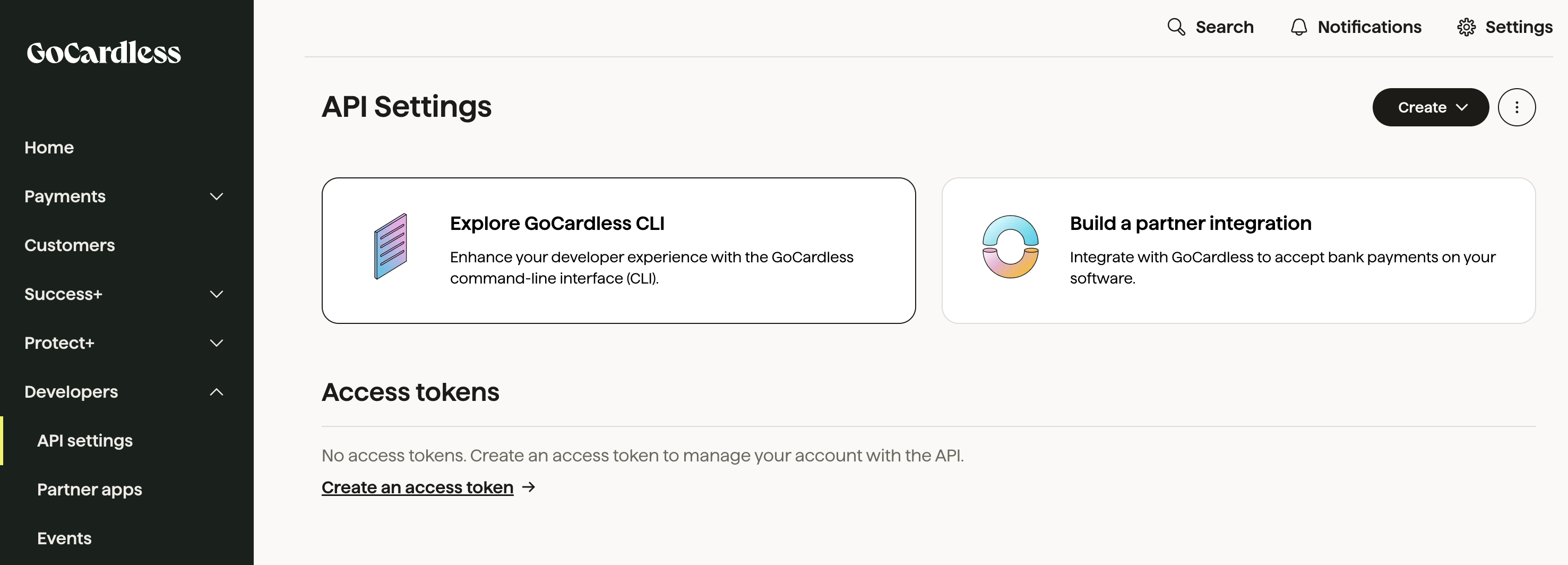
Find the access token in the GoCardless Admin Portal under **Developers** ->
**API Settings** -> **Access Tokens**.

<Frame>
  <Frame caption="GoCardless Access Token">
    <img src="https://mintcdn.com/gr4vy/S5HgrHw6Hv2p7BvQ/connections/assets/gocardless_access_token.png?fit=max&auto=format&n=S5HgrHw6Hv2p7BvQ&q=85&s=3f77558782e0f902245ca88aa3d04d2d" alt="" width="2954" height="1064" data-path="connections/assets/gocardless_access_token.png" />
  </Frame>
</Frame>

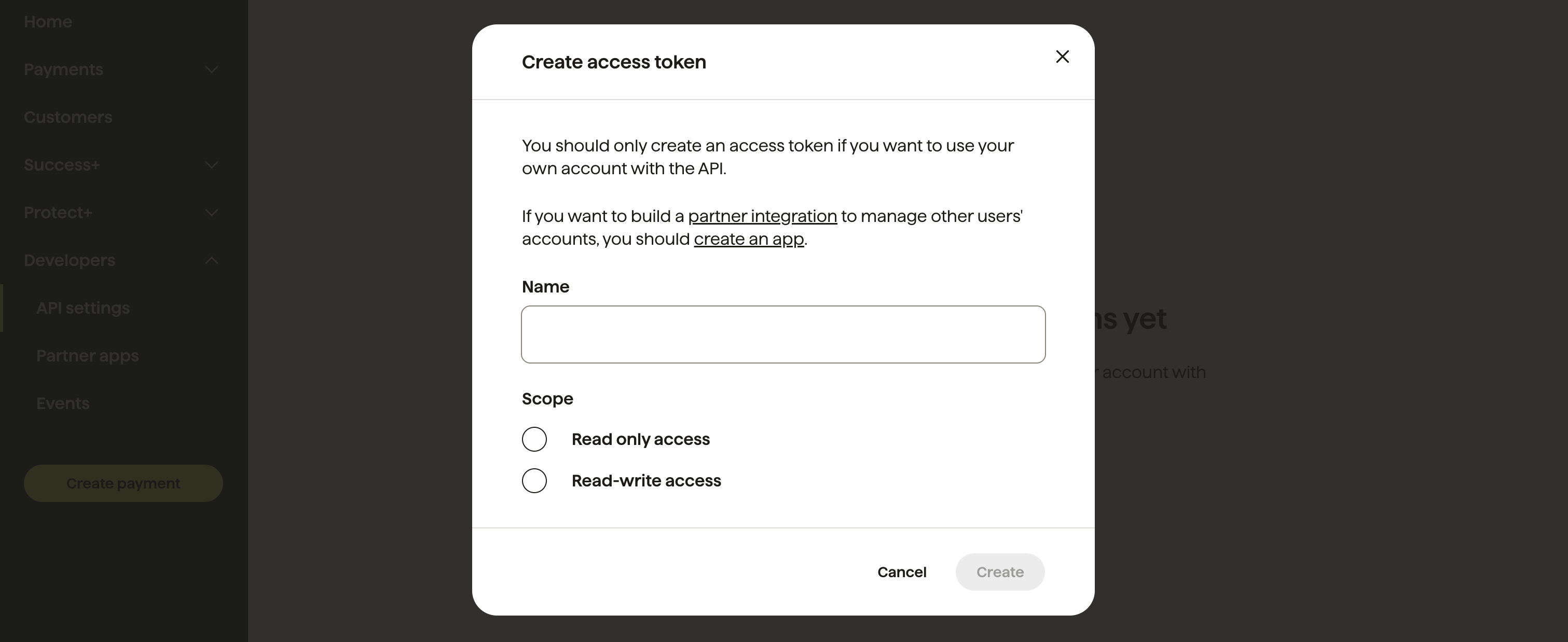
If there are no access tokens in the list, create a new access token by
clicking **Create an access token**.
<Frame>
  <Frame caption="GoCardless Create Access Token">
    <img src="https://mintcdn.com/gr4vy/S5HgrHw6Hv2p7BvQ/connections/assets/gocardless_create_access_token.png?fit=max&auto=format&n=S5HgrHw6Hv2p7BvQ&q=85&s=52a0a10fa6214ae0916605542b8b051c" alt="" width="3022" height="1238" data-path="connections/assets/gocardless_create_access_token.png" />
  </Frame>
</Frame>

## Supported countries

GoCardless supports transactions from buyers in the following countries:

| Country code | Country code | Country code | Country code | Country code | Country code | Country code | Country code |
| ------------ | ------------ | ------------ | ------------ | ------------ | ------------ | ------------ | ------------ |
| `AT`         | `AU`         | `BE`         | `BG`         | `CH`         | `CY`         | `CZ`         | `DE`         |
| `ES`         | `FI`         | `FR`         | `GB`         | `HR`         | `HU`         | `IE`         | `IT`         |
| `LU`         | `MT`         | `NL`         | `NO`         | `NZ`         | `PT`         | `RO`         | `SE`         |
| `SK`         | `US`         |              |              |              |              |              |              |

## Supported currencies

GoCardless supports processing payments in the following currencies:

| Currency code | Currency code | Currency code | Currency code | Currency code | Currency code | Currency code | Currency code |
| ------------- | ------------- | ------------- | ------------- | ------------- | ------------- | ------------- | ------------- |
| `AUD`         | `CAD`         | `DKK`         | `EUR`         | `GBP`         | `NZD`         | `SEK`         | `USD`         |

## Features

GoCardless supports the following features:

* **Payment method tokenization**: Store a bank payment method for reuse.
* **Refunds**: Refund transactions in full or in part.
* **Transaction sync**: Receive asynchronous updates for final status changes.

## Limitations

The following limitations apply:

* **USD and CAD transactions require tokenization**: USD and CAD transactions use ACH and PAD respectively by default,
  which do not support Instant Bank Pay. Set `store=true` before you create a USD or CAD transaction.
* **Purpose code required for AUD PayTo**: Provide a Purpose code either as a credential (global) or a
  connection option (per transaction). The credential value takes precedence.
* **Statement descriptor is required**: A `statement_descriptor` must be provided in the API request, containing either a `name` or a `description`.
* **Concurrent refunds not supported**: Submit a new refund only after the previous refund finishes processing.
* **Metadata limits**: GoCardless supports up to three metadata keys. One key is reserved, so extra keys are ignored.
* **Tokenized transactions start as pending**: Transactions made with a saved payment method initially have a `pending`
  status while GoCardless establishes the mandate. This process can take several days based on the bank scheme.
  Rely on webhooks or polling to confirm the final status.

## Integration

GoCardless supports redirect integration only. Create a transaction with a
redirect payment method, then send the buyer to the approval URL.

<CodeGroup>
  ```csharp C# theme={"system"}
  var transaction = await client.Transactions.CreateAsync(
      transactionCreate: new TransactionCreate()
      {
          Amount = 1299,
          Currency = "GBP",
          Country = "GB",
          PaymentMethod =
              TransactionCreatePaymentMethod.CreateCheckoutSessionWithUrlPaymentMethodCreate(
                  new RedirectPaymentMethodCreate()
                  {
                      Method = "gocardless",
                      RedirectUrl = "https://example.com/callback",
                  }
              ),
      }
  );
  ```

  ```go Go theme={"system"}
  amount := int64(1299)
  currency := "GBP"
  country := "GB"
  method := "gocardless"
  redirectUrl := "https://example.com/callback"

  redirectPaymentMethodCreate := components.RedirectPaymentMethodCreate{
      Method: method,
      RedirectUrl: redirectUrl,
  }
  paymentMethod := components.CreateTransactionCreatePaymentMethodRedirectPaymentMethodCreate(redirectPaymentMethodCreate)

  transactionCreate := components.TransactionCreate{
      Amount:        amount,
      Currency:      currency,
      Country:       &country,
      PaymentMethod: &paymentMethod,
  }

  transaction, err := client.Transactions.Create(ctx, transactionCreate, nil, nil)
  ```

  ```java Java theme={"system"}
  CreateTransactionResponse transactionResponse = gr4vyClient.transactions().create()
      .transactionCreate(TransactionCreate.builder()
          .amount(1299L)
          .currency("GBP")
          .country("GB")
          .paymentMethod(TransactionCreatePaymentMethod.of(RedirectPaymentMethodCreate.builder()
              .method("gocardless")
              .redirectUrl("https://example.com/callback")
              .build()))
          .build())
      .call();

  Transaction transaction = transactionResponse.transaction().orElse(null);
  ```

  ```php PHP theme={"system"}
  $transactionCreate = new TransactionCreate(
      amount: 1299,
      currency: 'GBP',
      country: 'GB',
      paymentMethod: new RedirectPaymentMethodCreate(
          method: 'gocardless',
          redirectUrl: 'https://example.com/callback'
      )
  );
  $response = self::$sdk->transactions->create($transactionCreate);
  $transaction = $response->transaction;
  ```

  ```python Python theme={"system"}
  transaction: models.Transaction = client.transactions.create(
      amount=1299,
      currency="GBP",
      country="GB",
      payment_method={
          "method": "gocardless",
          "redirect_url": "https://example.com/callback",
      }
  )
  ```

  ```ts TypeScript theme={"system"}
  const transaction = await gr4vy.transactions.create({
      amount: 1299,
      currency: "GBP",
      country: "GB",
      paymentMethod: {
          method: "gocardless",
          redirectUrl: "https://example.com/callback"
      }
  })
  ```
</CodeGroup>

After you create the transaction, the API response includes
`payment_method.approval_url` and the `buyer_approval_pending` status. Redirect
the buyer to the `approval_url` to approve the payment, then rely on webhooks
or polling to confirm the final status.