> ## Documentation Index
> Fetch the complete documentation index at: https://docs.gr4vy.com/llms.txt
> Use this file to discover all available pages before exploring further.

# Fiserv IPG - Card

> Connect to Fiserv IPG to accept card payments.

export const connector = {
  displayName: "Fiserv",
  method: "card",
  features: "create_token create_transaction delayed_capture delete_token digital_wallets issuer_based_installments multi_capture network_tokens_toggle open_loop partial_capture partial_refunds refunds three_d_secure_pass_through transaction_sync verify_credentials void zero_auth",
  supportedCountries: "AD AE AF AG AI AL AM AO AQ AR AS AT AU AW AX AZ BA BB BD BE BF BG BH BI BJ BL BM BN BO BQ BR BS BT BV BW BY BZ CA CC CD CF CG CH CI CK CL CM CN CO CR CU CV CW CX CY CZ DE DJ DK DM DO DZ EC EE EG EH ER ES ET FI FJ FK FM FO FR GA GB GD GE GF GG GH GI GL GM GN GP GQ GR GS GT GU GW GY HK HM HN HR HT HU ID IE IL IM IN IO IQ IR IS IT JE JM JO JP KE KG KH KI KM KN KP KR KW KY KZ LA LB LC LI LK LR LS LT LU LV LY MA MC MD ME MF MG MH MK ML MM MN MO MP MQ MR MS MT MU MV MW MX MY MZ NA NC NE NF NG NI NL NO NP NR NU NZ OM PA PE PF PG PH PK PL PM PN PR PS PT PW PY QA RE RO RS RU RW SA SB SC SD SE SG SH SI SJ SK SL SM SN SO SR SS ST SV SX SY SZ TC TD TF TG TH TJ TK TL TM TN TO TR TT TV TW TZ UA UG UM US UY UZ VA VC VE VG VI VN VU WF WS YE YT ZA ZM ZW",
  supportedCurrencies: "AED AUD AWG BBD BHD BIF BRL BSD BYN BZD CAD CHF CNY CZK DKK DOP EUR GBP GYD HKD HUF ILS INR JMD JPY KRW KWD KYD MXN MYR NOK NZD OMR PLN RON RSD RUB SAR SEK SGD SRD TRY TTD TWD USD VES XCD XCG ZAR"
};

export const ConnectorRegions = ({data, kind, name: nameOverride}) => {
  const [query, setQuery] = useState("");
  const [open, setOpen] = useState(false);
  const isCountries = kind === "countries";
  const raw = data && (isCountries ? data.supportedCountries : data.supportedCurrencies);
  const codes = typeof raw === "string" ? raw.split(/\s+/).filter(Boolean) : Array.isArray(raw) ? raw : [];
  const DISPLAY_NAME_OVERRIDES = {
    authorizenet: "Authorize.net",
    cardpointe: "Fiserv CardPointe",
    dlocal: "dLocal",
    shift4i4go: "Shift4 i4go",
    tokenex: "TokenEx"
  };
  const rawName = data && data.displayName || "";
  const name = nameOverride || DISPLAY_NAME_OVERRIDES[rawName.toLowerCase()] || rawName || "This connector";
  const verb = isCountries ? "supports transactions from buyers in" : "supports processing payments in";
  const noun = isCountries ? "countries" : "currencies";
  if (codes.length === 0) return null;
  let displayNames = null;
  try {
    displayNames = new Intl.DisplayNames(["en"], {
      type: isCountries ? "region" : "currency"
    });
  } catch (e) {
    displayNames = null;
  }
  const resolve = code => {
    if (!displayNames) return null;
    try {
      const resolved = displayNames.of(code);
      return resolved && resolved !== code ? resolved : null;
    } catch (e) {
      return null;
    }
  };
  const MAJOR_CURRENCIES = ["USD", "EUR", "GBP", "CAD", "AUD", "JPY", "CHF", "CNY", "SGD", "HKD", "NZD", "SEK", "NOK", "DKK", "MXN", "BRL", "INR"];
  const items = codes.map(code => ({
    code,
    label: resolve(code)
  }));
  if (isCountries) {
    items.sort((a, b) => (a.label || a.code).localeCompare(b.label || b.code));
  } else {
    const rank = code => {
      const i = MAJOR_CURRENCIES.indexOf(code);
      return i === -1 ? MAJOR_CURRENCIES.length : i;
    };
    items.sort((a, b) => rank(a.code) - rank(b.code) || a.code.localeCompare(b.code));
  }
  if (codes.length <= 3) {
    const parts = items.map(it => isCountries || !it.label ? it.label || it.code : `${it.label} (${it.code})`);
    const joined = parts.length === 1 ? parts[0] : parts.length === 2 ? `${parts[0]} and ${parts[1]}` : `${parts.slice(0, -1).join(", ")}, and ${parts[parts.length - 1]}`;
    return <p>
        {name} {verb} {joined}.
      </p>;
  }
  const chipStyle = {
    display: "inline-flex",
    alignItems: "baseline",
    gap: "0.4rem",
    padding: "0.15rem 0.55rem",
    borderRadius: "0.375rem",
    border: "1px solid rgba(128, 128, 128, 0.25)",
    fontSize: "0.875rem",
    lineHeight: 1.5
  };
  const codeStyle = {
    fontFamily: "var(--font-mono, ui-monospace, monospace)",
    fontWeight: 600,
    fontSize: "0.8125rem"
  };
  const controlStyle = {
    color: "inherit",
    background: "transparent",
    border: "1px solid rgba(128, 128, 128, 0.3)",
    borderRadius: "0.5rem",
    fontSize: "0.875rem"
  };
  const renderChip = it => <span key={it.code} style={chipStyle} title={isCountries ? it.code : it.label || it.code}>
      {isCountries ? it.label || it.code : <span style={codeStyle}>{it.code}</span>}
      {!isCountries && it.label ? <span style={{
    opacity: 0.7
  }}>{it.label}</span> : null}
    </span>;
  const PREVIEW = 5;
  const collapsible = items.length > PREVIEW;
  const q = query.trim().toLowerCase();
  const filtered = q ? items.filter(it => it.code.toLowerCase().includes(q) || it.label && it.label.toLowerCase().includes(q)) : items;
  const expanded = open || q !== "";
  const visible = !collapsible ? items : expanded ? filtered : items.slice(0, PREVIEW);
  const toggle = () => {
    const next = !open;
    setOpen(next);
    if (!next) setQuery("");
  };
  return <div>
      <p>
        {name} {verb} the following {codes.length} {noun}:
      </p>

      {collapsible ? <input type="text" value={query} onChange={e => setQuery(e.target.value)} placeholder={`Filter ${noun}…`} aria-label={`Filter ${noun}`} style={{
    ...controlStyle,
    display: "block",
    width: "100%",
    maxWidth: "22rem",
    padding: "0.4rem 0.7rem",
    margin: "0 0 0.75rem"
  }} /> : null}

      <div style={{
    display: "flex",
    flexWrap: "wrap",
    gap: "0.4rem"
  }}>
        {visible.map(renderChip)}
      </div>

      {q && filtered.length === 0 ? <p style={{
    opacity: 0.7,
    marginTop: "0.6rem"
  }}>
          No {noun} match “{query.trim()}”.
        </p> : null}
      {q && filtered.length > 0 ? <p style={{
    opacity: 0.6,
    fontSize: "0.8125rem",
    marginTop: "0.6rem"
  }}>
          Showing {filtered.length} of {items.length}.
        </p> : null}

      {collapsible && !q ? <button type="button" aria-expanded={open} onClick={toggle} style={{
    ...controlStyle,
    display: "inline-flex",
    alignItems: "center",
    gap: "0.4rem",
    padding: "0.35rem 0.75rem",
    marginTop: "0.75rem",
    cursor: "pointer"
  }}>
          <span aria-hidden="true" style={{
    display: "inline-block",
    transform: open ? "rotate(90deg)" : "none",
    transition: "transform 0.15s ease"
  }}>
            ›
          </span>
          {open ? "Show fewer" : `and ${items.length - PREVIEW} more`}
        </button> : null}
    </div>;
};

export const ConnectorCapabilities = ({data}) => {
  const CAPABILITIES = [{
    keys: ["three_d_secure_hosted"],
    label: "3-D Secure (hosted)",
    description: "Gr4vy-hosted 3DS authentication flow.",
    cardOnly: true
  }, {
    keys: ["three_d_secure_pass_through"],
    label: "3-D Secure (pass-through)",
    description: "Pass through 3DS data authenticated by a third party.",
    cardOnly: true
  }, {
    keys: ["partial_authorization"],
    label: "Partial authorization",
    description: "Support partial approval responses."
  }, {
    keys: ["zero_auth"],
    label: "Zero auth",
    description: "Verify a card without charging it."
  }, {
    keys: ["void"],
    label: "Void",
    description: "Cancel an authorized transaction before capture."
  }, {
    keys: ["direct_capture"],
    label: "Direct capture",
    description: "Capture a payment immediately at authorization.",
    hideWhenUnsupported: true
  }, {
    keys: ["delayed_capture"],
    label: "Delayed capture",
    description: "Authorize a payment and capture it at a later time."
  }, {
    keys: ["partial_capture"],
    label: "Partial capture",
    description: "Capture a portion of the authorized amount."
  }, {
    keys: ["over_capture"],
    label: "Over capture",
    description: "Capture more than the originally authorized amount."
  }, {
    keys: ["refunds"],
    label: "Refunds",
    description: "Refund a captured payment."
  }, {
    keys: ["partial_refunds"],
    label: "Partial refunds",
    description: "Refund a portion of the captured amount."
  }, {
    keys: ["settlement_reporting"],
    label: "Settlement reporting",
    description: "Automatic settlement and reconciliation reporting."
  }, {
    keys: ["create_session"],
    label: "Create session",
    description: "Create a connector session for client-side flows."
  }, {
    keys: ["network_tokens_default", "network_tokens_toggle"],
    label: "Network tokens",
    description: "Network-level tokenization for improved approval rates.",
    cardOnly: true
  }, {
    keys: ["digital_wallets"],
    label: "Digital wallets",
    description: "Apple Pay, Google Pay, and other wallet integrations."
  }, {
    keys: ["payment_method_tokenization", "payment_method_tokenization_toggle"],
    label: "Payment method tokenization",
    description: "Store payment methods outside of transactions."
  }, {
    keys: ["transaction_sync"],
    label: "Transaction sync",
    description: "Synchronize transaction state from the connector."
  }, {
    keys: ["create_token"],
    label: "Tokenization",
    description: "Create a token from card details collected via Secure Fields.",
    hideWhenUnsupported: true
  }, {
    keys: ["delete_token"],
    label: "Delete token",
    description: "Delete a stored token.",
    hideWhenUnsupported: true
  }, {
    keys: ["verify_credentials"],
    label: "Verify credentials",
    description: "Validate the configured credentials against the connector.",
    hideWhenUnsupported: true
  }];
  const raw = data && data.features;
  const enabled = typeof raw === "string" ? new Set(raw.split(/\s+/).filter(Boolean)) : Array.isArray(raw) ? new Set(raw) : new Set(Object.keys(raw || ({})).filter(key => raw[key]));
  const isOn = entry => entry.keys.some(key => enabled.has(key));
  const isNonCard = data && data.method && data.method !== "card";
  const renderGroup = (title, entries, supported) => {
    if (entries.length === 0) return null;
    const mark = supported ? "✓" : "✕";
    const markColor = supported ? "#16a34a" : "#9ca3af";
    return <div style={{
      marginTop: "1rem"
    }}>
        <div style={{
      fontSize: "0.75rem",
      fontWeight: 600,
      letterSpacing: "0.05em",
      textTransform: "uppercase",
      opacity: 0.6,
      marginBottom: "0.25rem"
    }}>
          {title}
        </div>
        {}
        <div role="list">
          {entries.map(entry => <div role="listitem" key={entry.label} style={{
      display: "flex",
      gap: "0.5rem",
      alignItems: "baseline",
      padding: "0.3rem 0",
      opacity: supported ? 1 : 0.7
    }}>
              <span aria-hidden="true" style={{
      color: markColor,
      fontWeight: 700,
      flexShrink: 0
    }}>
                {mark}
              </span>
              <span>
                <strong>{entry.label}</strong>
                {entry.description ? <span style={{
      opacity: 0.85
    }}> — {entry.description}</span> : null}
              </span>
            </div>)}
        </div>
      </div>;
  };
  const visible = isNonCard ? CAPABILITIES.filter(entry => !entry.cardOnly) : CAPABILITIES;
  const supported = visible.filter(isOn);
  const unsupported = visible.filter(entry => !isOn(entry) && !entry.hideWhenUnsupported);
  return <div>
      {renderGroup("Supported", supported, true)}
      {renderGroup("Not supported", unsupported, false)}
    </div>;
};

Fiserv IPG (Internet Payment Gateway) is a payment processing platform from
Fiserv, a global financial services technology company. It provides card payment
processing for businesses worldwide.

## Setup

Fiserv IPG provides self-service sign-up for a sandbox account. To sign up for
an account, visit the [Fiserv registration page](https://portal.fiserv.dev/user/registration/).

## Connector configuration

After setting up your Fiserv IPG connector in the dashboard, configure how
transactions are routed to it. Choose one of the following options:

* **Using Flow** - Configure Fiserv IPG as the target connector in
  [Flow](/guides/dashboard/flow/overview) to automatically route card
  transactions to this connector
* **Using the API** - Explicitly set the `payment_service_id` parameter to the
  Fiserv IPG connector ID when creating transactions. This overrides any Flow
  routing rules.

The connector ID can be found in the dashboard under **Connections** ->
**Configured connections**.

## Credentials

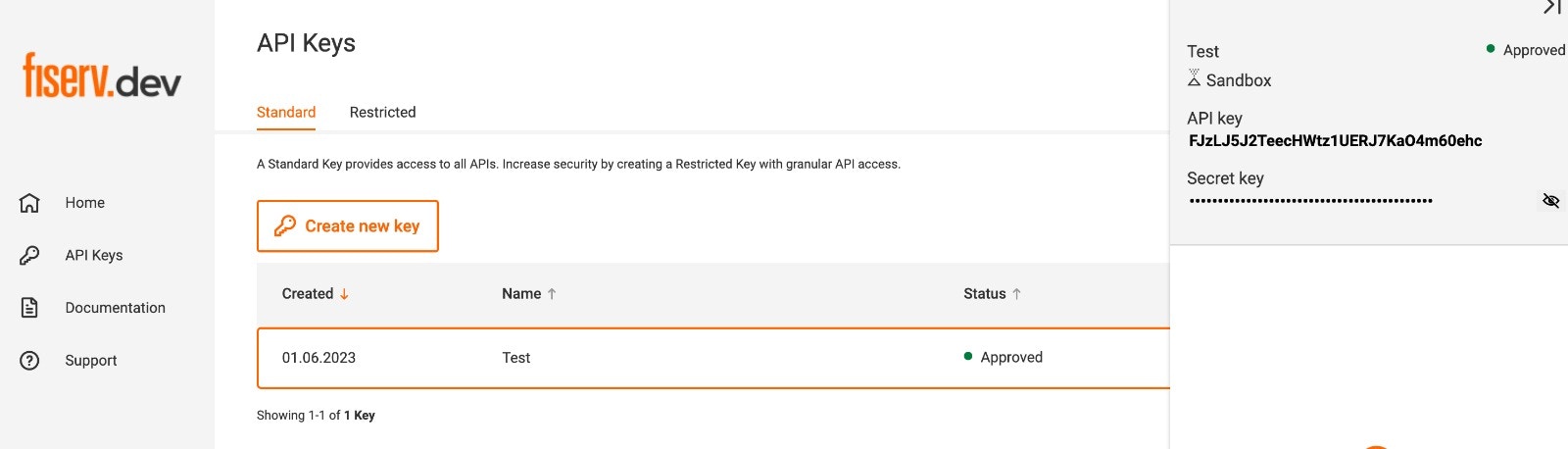
When setting up Fiserv IPG in the dashboard, configure the following credentials
from the [Fiserv portal](https://portal.fiserv.dev/user/login).

* **API key** - The API key from the Fiserv dashboard under **API Keys**.
* **Secret key** - The secret key found under the API key in the Fiserv
  dashboard under **API Keys**.
* **Store ID** - Your Fiserv store identifier.

<Frame>
  <img src="https://mintcdn.com/gr4vy/81rUFzs1xxqEKdRI/connections/assets/fiserv.png?fit=max&auto=format&n=81rUFzs1xxqEKdRI&q=85&s=3f86bac82d18a80ba2281c7ae6a66ac6" alt="Fiserv" width="1600" height="458" data-path="connections/assets/fiserv.png" />
</Frame>

## Capabilities

<ConnectorCapabilities data={connector} />

## Supported countries

<ConnectorRegions data={connector} kind="countries" />

## Supported currencies

<ConnectorRegions data={connector} kind="currencies" />

## Limitations

* **Google Pay CVV** - To accept Google Pay transactions, your Fiserv merchant
  account or store ID must have the CVV field set as non-mandatory.

## Integration

To accept card payments with Fiserv, use one of Gr4vy's client-side integration
methods to securely collect card details. Due to PCI compliance requirements,
card data should never be sent directly to your servers.

You can integrate using:

* **[Embed](/guides/payments/embed/quick-start)** - A pre-built, customizable
  payment form that handles the complete payment flow
* **[Secure Fields](/guides/payments/secure-fields/quick-start)** - Embed card
  input fields for building custom payment forms while maintaining PCI
  compliance
* **[Mobile SDKs](/guides/get-started#sdks-and-plugins)** - Native SDKs for iOS,
  Android, React Native, and other platforms

These methods handle card data collection and tokenization. Once the card
details are collected and tokenized, create a transaction through the Gr4vy API,
which routes the payment to your configured Fiserv connection based on your Flow
rules or explicit `payment_service_id` parameter.