> ## Documentation Index
> Fetch the complete documentation index at: https://docs.gr4vy.com/llms.txt
> Use this file to discover all available pages before exploring further.
# Adyen
> Connect to Adyen to accept card payments and local payment methods.
Adyen is a global payment technology company founded in 2006 in Amsterdam, Netherlands. The company provides a single platform for accepting payments across online, mobile, and in-store channels for major enterprises worldwide including Uber, Spotify, and Microsoft.
## Supported payment methods
| Method | Countries | Currencies | Notes |
| -------------------------------------------------------- | ------------------------- | --------------------- | ------------------------------------------ |
| [Bank (ACH, SEPA, BACS)](./adyen-bank) | `AT`, `BE`, `BG`, 26 more | `EUR`, `GBP`, `USD` | Bank transfer via ACH, SEPA, or BACS. |
| [ACH Direct Debit](./adyen-ach) | `PR`, `US` | `USD` | Bank debit via the Adyen Drop-in. |
| [Alipay](./adyen-alipay) | `AT`, `AU`, 43 more | `AUD`, `CAD`, 13 more | Digital wallet payments. |
| [BLIK](./adyen-blik) | `PL` | `PLN` | Code-based payments in Poland. |
| [Card](./adyen-card) | `AE`, `AL`, 78 more | `AED`, `ALL`, 88 more | Card processing via Adyen. |
| [Cash App Pay](./adyen-cashapp) | `US` | `USD` | Digital wallet payments. |
| [GCash](./adyen-gcash) | `PH` | `PHP` | Mobile wallet payments in the Philippines. |
| [iDEAL](./adyen-ideal) | `NL` | `EUR` | Bank redirect in the Netherlands. |
| [Konbini](./adyen-konbini) | `JP` | `JPY` | Convenience store cash payments in Japan. |
| [Online Banking Czech Republic](./adyen-onlinebankingcz) | `CZ` | `CZK` | Bank redirect in the Czech Republic. |
| [Plaid](./adyen-paybybank) | `PR`, `US` | `USD` | Bank debit via the Adyen Drop-in. |
| [PIX](./adyen-pix) | `BR` | `BRL` | Instant payments in Brazil. |
| [SEPA](./adyen-sepa) | `AT`, `BE`, 26 more | `EUR` | SEPA direct debit. |
| [Sofort](./adyen-sofort) | `AT`, `BE`, 4 more | `CHF`, `EUR` | Bank redirect in Europe. |
| [Swish](./adyen-swish) | `SE` | `SEK` | Mobile wallet payments in Sweden. |
| [Vipps](./adyen-vipps) | `NO` | `NOK` | Mobile wallet payments in Norway. |
## Setup
Adyen provides a self-service sign-up for a sandbox account. To sign up for an
account visit the [sign-up page](https://www.adyen.com/signup) and fill in the
details.
## Credentials
To set up credentials for Adyen, head to their dashboard and navigate to
**Developers** -> **API credentials** in the left hand sidebar.
Next, create a set of credentials. You need to create a **Web Service**
key and give it a name. Setting the name to something that describes
the use for the key is recommended, for example `Orchestration API`.
For most Adyen connectors you need to then copy some of the following details
into the dashboard.
* **A server-side API key** - This key can be found on the credentials page
under **Server Settings** -> **Authentication** -> **API key**. This is the key
used to communicate with the Adyen API from the server.
* **A client-side key** - This key can be found on the credentials page
under **Client Settings** -> **Authentication** -> **Client key**. This is the key
used to communicate with the Adyen API from frontend integrations. This
key is mostly needed for local and alternative payment methods.
* **A merchant account** - This is the public ID of your account. This value is needed
for most API calls. You can find this in your dashboard under **Settings** ->
**Account settings** -> **Merchant overview** -> **Name**.
## Productions endpoints (conditional)
Most live Adyen accounts have a custom API hostname configured. In those situations
the value of the prefix of your domain name is needed.
For example, if your live URL is
`https://1797a841fbb37ca7-AdyenDemo-checkout-live.adyenpayments.com/checkout/v53/payments`
then the live URL prefix would be `1797a841fbb37ca7-AdyenDemo`.
See
[Live URL prefix](https://docs.adyen.com/development-resources/live-endpoints#live-url-prefix)
for more details.
## Allowed origins (conditional)
For alternative payment methods it's essential to also enable
the allowed origin for your instance. This allows connections to the Adyen
API from hosted components, like Embed.
For a given API credential, scroll down to the **Client settings** section
where you find the **allowed origins** configuration. Add one of the
following domains based on your environment.
* `https://cdn.{instance_id}.gr4vy.app`
* `https://cdn.sandbox.{instance_id}.gr4vy.app`
The value of `{instance_id} ` is the name of your instance.
### Web components environment (conditional)
It is required to set the environment to load the web components from for
live Adyen transactions. This mainly applies to alternative payment methods and not
card payments.
The environment should be set to one of the following, depending on your region.
If no value is provided, a default value of `live` is used.
| Region | Environment Value |
| ----------------------- | ----------------- |
| Europe | `live` |
| Australia | `live-au` |
| United States | `live-us` |
| Asia Pacific South East | `live-apse` |
## Webhook format
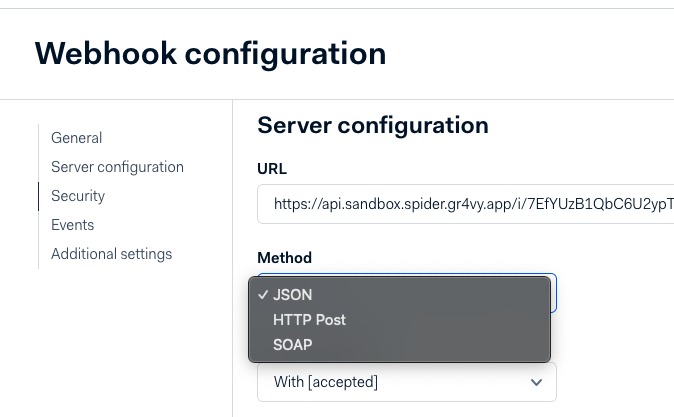
In the Adyen panel, "Webhook configuration" section, "Method" should be set to JSON.
 ## Identifier limitations
When an approval is required on a transaction, the `payment_service_transaction_id` changes between the transaction creation and the approval.
This is because until the user approves, Adyen generates an offer, and the payment is generated only after the approval. See [Offers and Payments](https://help.adyen.com/knowledge/payments/payment-basics/what-is-an-offer-and-how-do-i-search-for-one) for more details.
## Identifier limitations
When an approval is required on a transaction, the `payment_service_transaction_id` changes between the transaction creation and the approval.
This is because until the user approves, Adyen generates an offer, and the payment is generated only after the approval. See [Offers and Payments](https://help.adyen.com/knowledge/payments/payment-basics/what-is-an-offer-and-how-do-i-search-for-one) for more details.